Auto-Enrich New CRM Companies with ChatGPT Web Research via Tavily


Last edited 223 days ago
Overview
This template benefits anyone who wants to:
- automate web research on a prospect company
- compile that research into an easily readable note and save the note into CentralStationCRM
Tools in this workflow
- CentralStationCRM, the easy and intuitive CRM Software for small teams. Here is our API Documentation if you want to customize the workflow.
- ChatGPT, the well-known ai chatbot
- Tavily, a web search service for large language models
Disclaimer
Tavily Web Search is (as of yet) a community node. You have to activate the use of community nodes inside your n8n account to use this workflow.
Workflow Screenshot
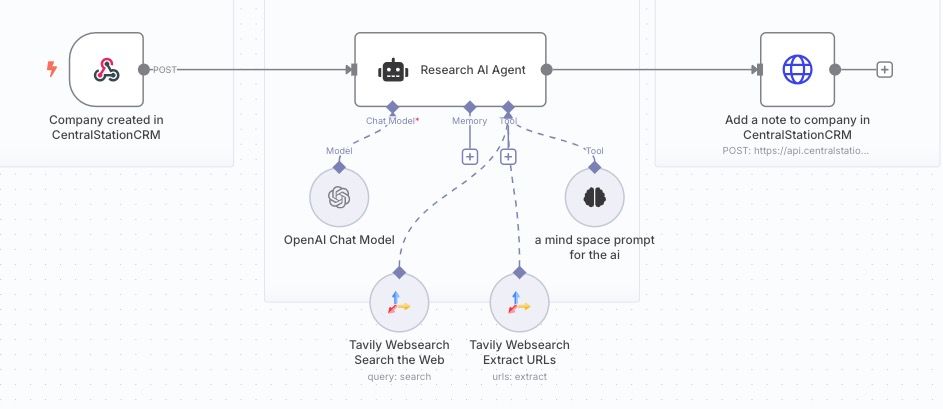
Workflow Description
The workflow consists of:
- a webhook trigger
- an ai agent node
- an http request node
The Webhook Trigger
The Webhook is set up in CentralStationCRM to trigger when a new company is created inside the CRM.
The Webhook Trigger Node in n8n then fetches the company data from the CRM.
The AI Agent Node
The node uses ChatGPT as ai chat model and two Tavily Web Search operations ('search for information' and 'extract URLs') as tools. Additionally, it uses a simple prompt as tool, telling the ai model to re-iterate on the research data if applicable.
The AI Agent Node takes the Company Name and prompts ChatGPT to "do a deep research" on this company on the web. "The research shall help sales people get a good overview about the company and allow to identify potential opportunities."
The AI Agent then formats the results into markdown format and passes them to the next node.
The CentralStationCRM protocol node
This is an HTTP Request to the CentralStationCRM API. It creates a 'protocol' (the API's name for notes in the CRM) with the markdown data it received from the previous node.
This protocol is saved in CentralStationCRM, where it can easily be accessed as a note when clicking on the new company entry.
Customization ideas
Even though this workflow is pretty simple, it poses interesting possibilities for customization.
For example, you can alter the Webhook trigger (in CentralstationCRM and n8n) to fire when a person is created. You have to alter the AI prompt as well and make sure the third node adds the research note to the person, not a company, via the CentralStationCRM API.
You could also swap the AI model used here for another one, comparing the resulting research data and get a deeper understanding of ai chat models.
Then of course there is the prompt itself. You can definitely double down on the information you are most interested in and refine your prompt to make the ai bot focus on these areas of search. Start experimenting a bit!
Preconditions
For this workflow to work, you need
- a CentralStationCRM account with API Access
- an n8n account with API Access
- an Open AI account with API Access
Have fun with our workflow!
You may also like
New to n8n?
Need help building new n8n workflows? Process automation for you or your company will save you time and money, and it's completely free!


