Automate LinkedIn Lead Generation and Connection Requests with Browserflow

Last edited 206 days ago
Auto find & invite LinkedIn Leads
This n8n template automates LinkedIn lead generation by scraping profiles, filtering out existing connections, and sending connection requests — all in a controlled, looped workflow. Ideal for outreach campaigns, recruitment, or lead gen efforts.
⚠️ Disclaimer – Community Node Notice
This template uses a verified community node available inside the n8n cloud environment.
To use it, go to "Nodes" → search for:
Browserflow for Linkedin
…and click Install.
It’s officially verified and accessible directly from n8n cloud.
In case you wish to run this template locally, you need to go to the settings, click community nodes and search for n8n-nodes-browserflow. Then after installing you can start using the actions in this node.
🛠️ How to Use
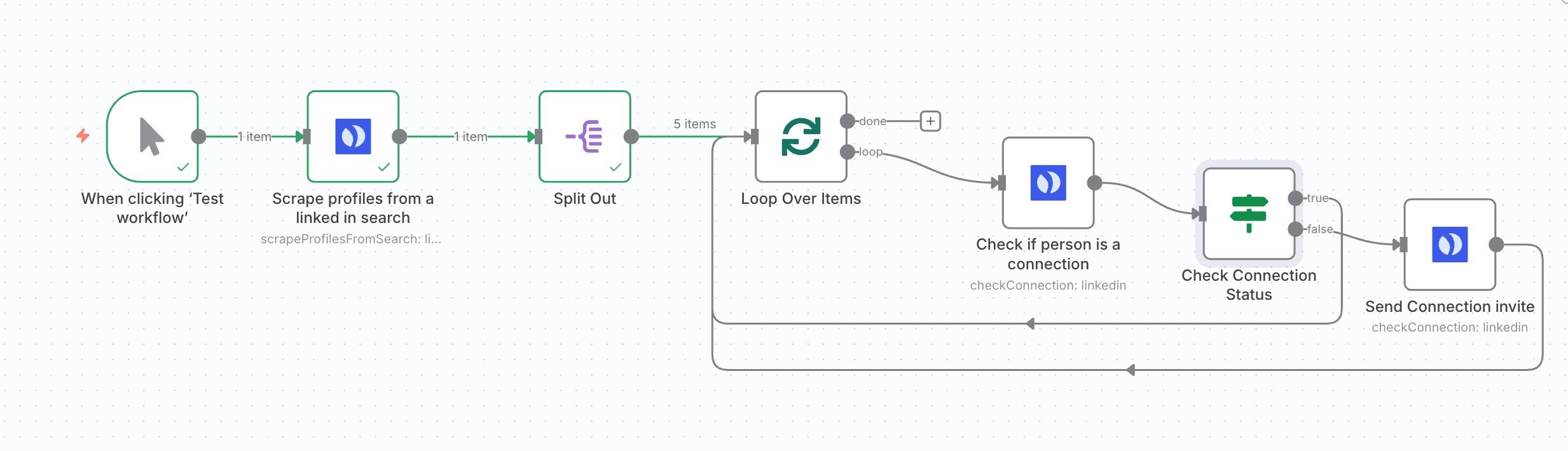
Trigger: Manual Start
Initiates the workflow manually via the “Test workflow” button, giving you full control.
Scrape LinkedIn Profiles
Uses the Browserflow automation to extract profile links from a LinkedIn search or keyword query.
Split Out Results
Converts the list of profiles into individual items for single-profile processing.
Loop Through Each Profile
Ensures each LinkedIn profile is handled one at a time, avoiding simultaneous actions.
Check Existing Connection
Verifies if you’re already connected with the lead on LinkedIn.
Conditional Logic
✅ Already Connected → Skip to next profile
❌ Not Connected → Continue to next step
Send Connection Invite
Sends a LinkedIn connection request, optionally with a personalized message.
📦 Requirements
-
n8n (cloud or self-hosted)
-
Installed community node: Browserflow for Linkedin
-
LinkedIn account
-
Valid Browserflow acount (you can set up a free 7-day trial at https://browserflow.io)
⚙️ Setup Instructions
Install the Browserflow Community Node
Search “Browserflow for Linkedin” > Install.
Get your API key
Get your API key at https://browserflow.io
Setup your Browserflow account
After registering, setup your Browserflow and connect with Linkedin using the wizard at https://browserflow.io
Connect with Browserflow by making a credential
Click on the Browserflow actions to setup a connection with Browserflow by adding your API key to a credential.
🧩 Customization Tips
Targeting: Adjust the Browserflow actions to scrape specific roles, industries, or locations.
Messaging: You can add a message to the connection invite but remind that LinkedIn limits the amount of messages that can be send each month. Use variables in the message for personalization (e.g., {firstName}).
Trigger: Replace manual trigger with a cron node for scheduled outreach.
Integration: Combine with CRM tools (e.g., HubSpot, Notion, Airtable) for syncing leads or integrate with AI Agents.
You may also like

New to n8n?
Need help building new n8n workflows? Process automation for you or your company will save you time and money, and it's completely free!


