Automate LLM Testing with GPT-4 Judge & Google Sheets Tracking


Categories
Created by
adAdam JanesLast edited 206 days ago
How it works
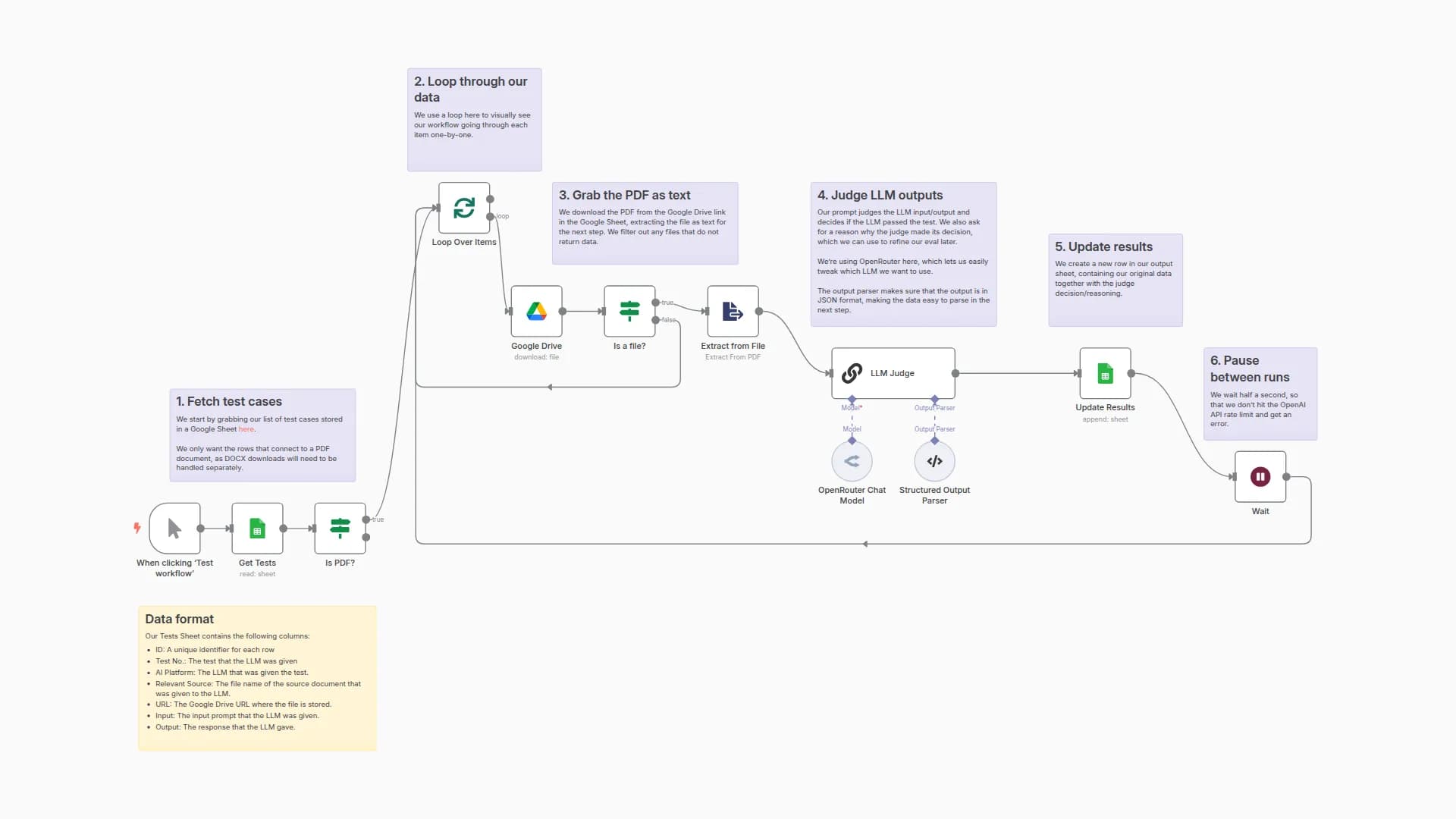
- The workflow loads a list of test cases from a Google Sheet (previous results stored from an LLM)
- For each test case, we execute a call to an LLM judge in parallel (using HTTP Request + Webhook nodes)
- The judge uses the Input, Output, and Reference Answer fields from the spreadsheet to mark each LLM response as Pass/Fail
- The results are logged into a separate sheet in the same Sheets file.
Set up steps:
- Add your credentials for Google Sheets and OpenRouter (or replace the OpenRouter node with your favourite chat model).
- Make a copy of the example Sheet to populate it with you own test data.
- Run the workflow with the Execute Workflow button next to the Manual Trigger node.
You may also like

New to n8n?
Need help building new n8n workflows? Process automation for you or your company will save you time and money, and it's completely free!


