Automate WordPress Category Mapping with GPT-5 Mini (Azure OpenAI)


Last edited 205 days ago
WP Category Toolkit automates mapping content topics to your WordPress category IDs using your WordPress REST API and a GPT-5mini model.
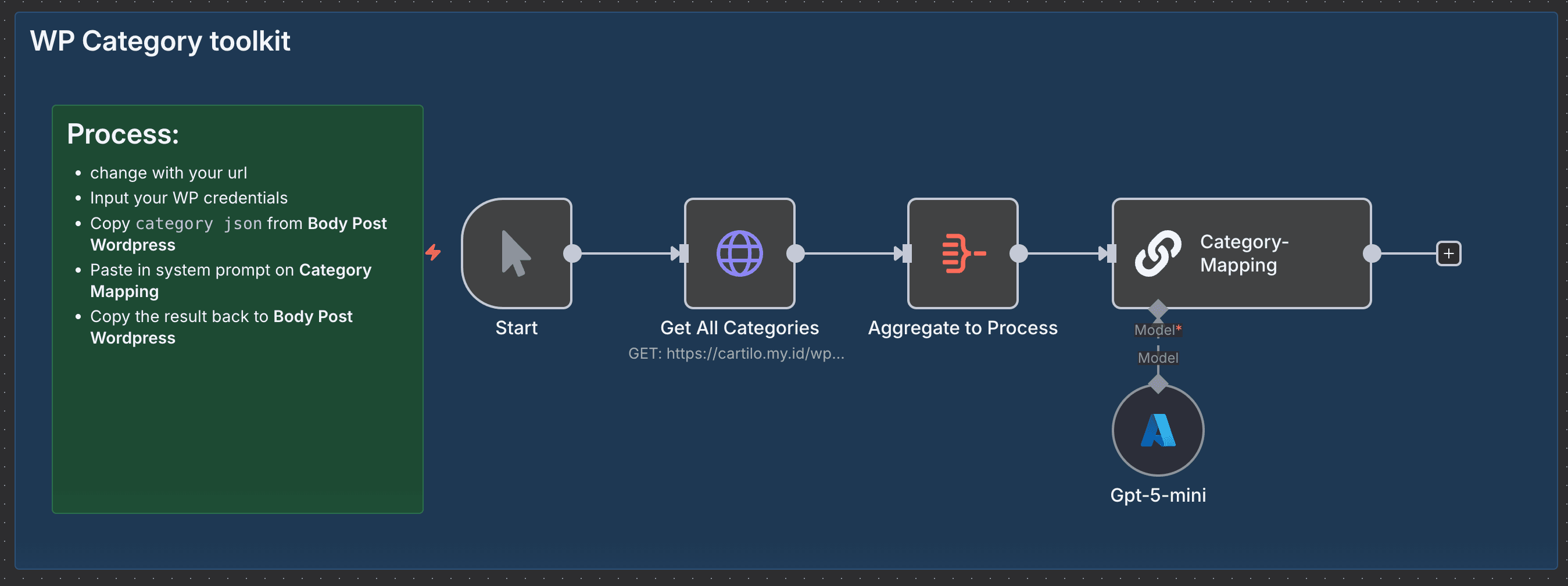
It replaces manual copy-paste and guesswork when assigning categories, speeds up publishing, and reduces tagging errors so your site stays organized and search friendly without you learning new dev magic (just a bit of prompt craft).
💡 Why Use WP Category Toolkit?
- Saves time: Cuts hours of manual category lookup and mapping—deploy batches of posts in minutes, not coffee breaks.
- Stops messy tagging: Eliminates inconsistent category assignments so your archive and SEO behave themselves.
- Measurable improvement: Expect faster publish cycles and fewer category fixes (reduce manual mapping errors by ~90%).
- Competitive edge: Uses an LLM to interpret topic intent, so your categories align with content meaning, not guesswork—like having a librarian who understands your jokes.
⚡ Perfect For
- Content Managers: Keep large WordPress catalogs neat without the spreadsheet gymnastics.
- Agencies: Onboard client sites faster by automating taxonomy mapping across projects.
- Developers & Automators: Add an LLM-powered mapping step to content pipelines without building custom classifiers.
🔧 How It Works
- ⏱ Trigger: Manual start (kick it off when you’re ready to map categories).
- 📎 Process: Pull all site categories from your WordPress REST endpoint, aggregate the list, and feed the source content + current topic into the mapping step.
- 🤖 Smart Logic: A Chain LLM node (Category-Mapping) uses a small prompt to decide which WordPress category IDs match the content topic (GPT5-mini handles the reasoning).
- 💌 Output: A clean category ID mapping you can paste into your Body Post WordPress node or use to patch posts automatically.
🔐 Quick Setup
- Import JSON file to your n8n instances → n8n Import Link
- Add credentials: WordPress API credential & Azure OpenAI (GPT5-mini) credential or you can use usual open AI node
- Update: Replace the WP endpoint URLand any post-body endpoints you’ll write back to
- Test: Run with a sample post and copy the output mapping into your Body Post WordPress node to confirm IDs match expected categories
🧩 You'll Need
- Active n8n instances → n8n Partner Link
- WordPress REST API access and credentials (
wp-jsonaccess) - Azure OpenAI account with access to GPT5-mini
- Integrations: WordPress API node, Chain LLM / Azure OpenAI node
- (Optional) Staging WordPress site to test mappings safely
🛠️ Level Up Ideas
- Auto-write category descriptions based on mapped content using the LLM. (It’ll sound smarter than your coffee.)
- Patch posts automatically after mapping so mapping becomes truly zero-touch.
- Add fallback heuristics: if the LLM is uncertain, route to a Slack/Microsoft Teams approval step.
Made by: Khairul
Tags: WordPress, Categories, AI, n8n
Category: WordPress
Need custom work? Contact me
You may also like
New to n8n?
Need help building new n8n workflows? Process automation for you or your company will save you time and money, and it's completely free!


