Automatic LinkedIn Engagement with AI Comments using GPT-4o and Phantombuster


Last edited 206 days ago
Who’s it for
B2B marketers, recruiters, and personal-brand builders who want to spark
conversations on LinkedIn by automatically posting short, relevant comments on
fresh industry content—while staying under daily limits.
How it works / What it does
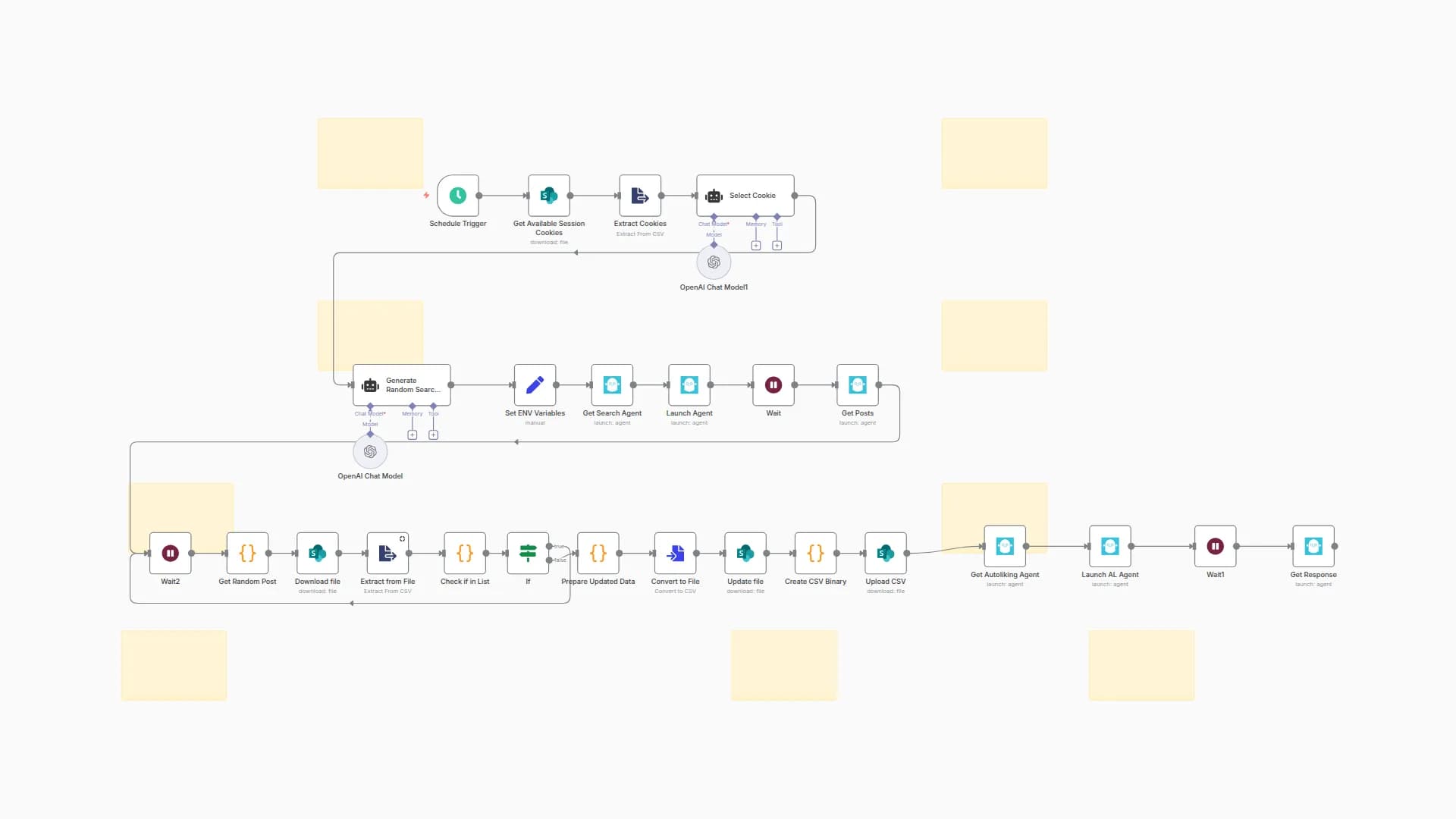
- Schedule Trigger fires every hour.
- Select Cookie picks a rotating LinkedIn session-cookie (time-slice logic).
- Generate Random Search Term (GPT-4o) outputs a realistic AI/BPA keyword.
- LinkedIn Search Agent (Phantombuster) scrapes recent posts.
- Get Random Post chooses one post and passes its text to Create Comment
(GPT-4o) which returns a ≤150-character reply in the chosen language. - Builds
linkedin_posts_to_comment.csv, uploads to SharePoint, and launches
the Auto-comment Agent to post the reply. - Post URL is logged to
linkedin_posts_already_commented.csvto avoid
duplicates. - Wait nodes throttle launches to ~120 comments/day.
How to set up
- Add credentials: Phantombuster API, SharePoint OAuth2, OpenAI API key.
- In SharePoint › “Phantombuster” folder create:
•linkedin_session_cookies.txt– one cookie per line.
•linkedin_posts_already_commented.csvwith headerpostUrl. - Edit Set ENV Variables to set default language, comment prompt,
company ID, etc. - Adjust schedule or comments-per-launch as needed.
- Activate the workflow; it will run hourly and comment on one new post each
launch.
Requirements
- n8n 1.33 +
- Phantombuster Growth plan (API access)
- OpenAI account
- Microsoft 365 SharePoint tenant
How to customize
- Change tone/length: edit the prompt in Create Comment.
- Comment more often: raise
numberOfLinesPerLaunchand schedule frequency. - Use Google Drive/Dropbox instead of SharePoint by swapping storage nodes.
You may also like
New to n8n?
Need help building new n8n workflows? Process automation for you or your company will save you time and money, and it's completely free!


