Build and Update RAG System with Google Drive, Qdrant, and Gemini Chat


Last edited 205 days ago
This workflow automates the creation and management of a Retrieval-Augmented Generation (RAG) system using Qdrant as a vector store and Google Drive as the document source. It enables full or incremental updates to documents in the Qdrant vector database and integrates with a chatbot using Google Gemini for question answering.
Here is a clear and professional description in English of the n8n workflow “Create a RAG with Qdrant and update single files”, including its benefits:
Benefits
-
Efficient RAG Setup
Seamlessly integrates OpenAI, Qdrant, and Google Drive to create a scalable RAG pipeline. -
Single File Update
You can replace the vector representation of a single file without reprocessing the entire collection—ideal for maintaining document freshness. -
Flexible File Source
Works with Google Drive, allowing document management and updates from a familiar interface.
How It Works
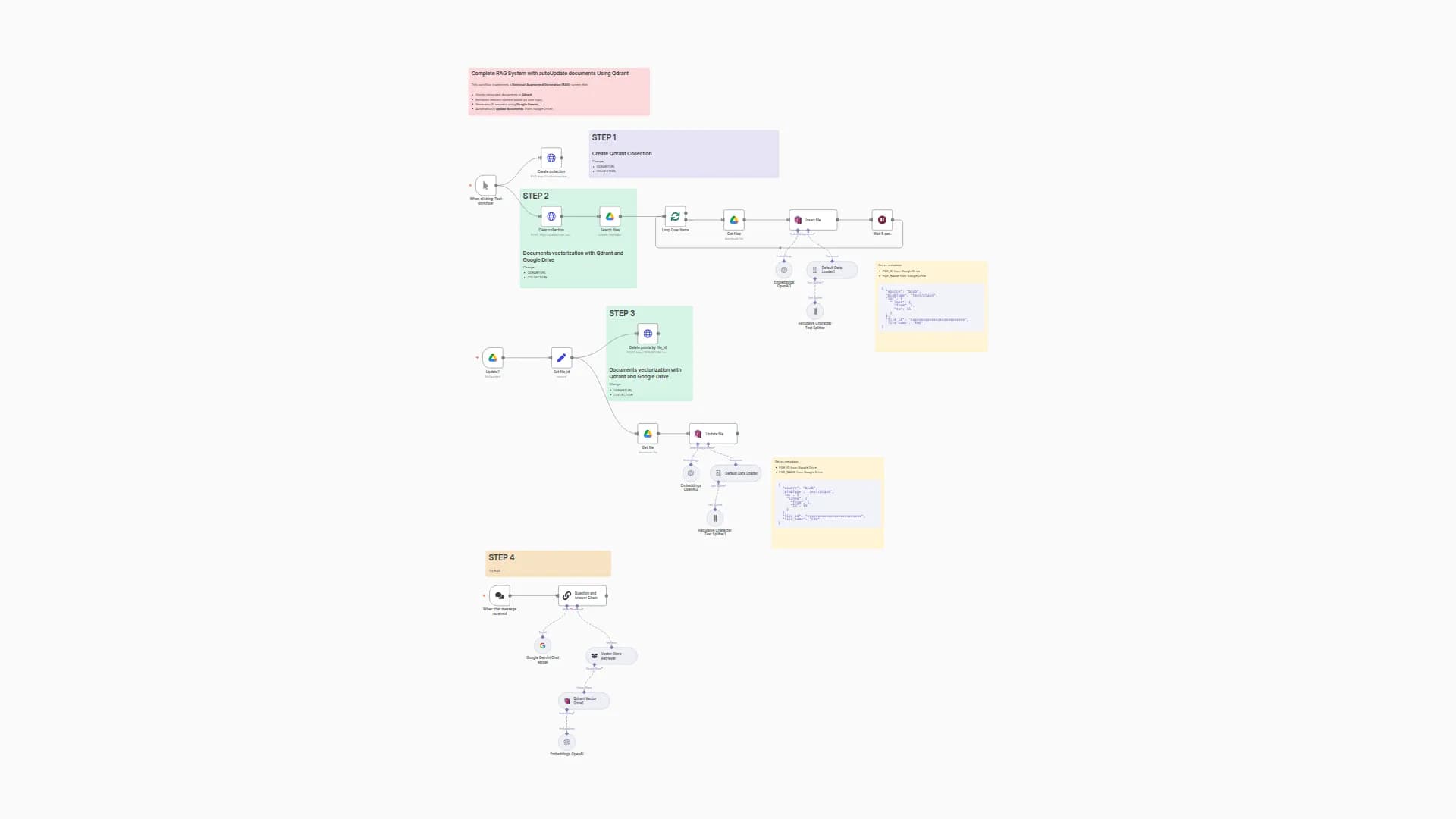
This workflow is designed to create a Retrieval-Augmented Generation (RAG) system using Qdrant as a vector store and Google Drive as a document source. It consists of four main phases:
-
Collection Setup:
- Creates or clears a Qdrant collection to store vectorized documents.
- Configures the collection with cosine distance metrics and other parameters.
-
Document Processing:
- Retrieves files from a specified Google Drive folder.
- Downloads and processes each file (text extraction, chunking, and embedding using OpenAI).
- Stores the embeddings in Qdrant for vector search.
-
Single-File Update:
- Allows updating or deleting a specific file in the Qdrant collection by referencing its Google Drive ID.
- Re-embeds the file and updates the vector store.
-
RAG Querying:
- Uses a chat trigger to receive user questions.
- Retrieves relevant documents from Qdrant using vector similarity.
- Generates answers using Google Gemini as the language model.
Set Up Steps
-
Configure Qdrant:
- Replace
QDRANTURLandCOLLECTIONin the "Create collection" and "Clear collection" HTTP nodes. - Ensure Qdrant API credentials are correctly set in the credentials section.
- Replace
-
Google Drive Integration:
- Specify the Google Drive folder ID in the "Get files" node.
- Ensure Google Drive OAuth credentials are configured.
-
OpenAI and Gemini Keys:
- Add OpenAI API credentials for embeddings (used in "Embeddings OpenAI" nodes).
- Configure Google Gemini credentials for the chat model.
-
Single-File Update:
- Set the
file_idin the "Edit Fields3" node to target a specific Google Drive file for updates.
- Set the
-
Testing:
- Trigger the workflow manually to populate the Qdrant collection.
- Use the chat interface to test RAG responses.
Need help customizing?
Contact me for consulting and support or add me on Linkedin.
You may also like
New to n8n?
Need help building new n8n workflows? Process automation for you or your company will save you time and money, and it's completely free!


