Create AI-Generated Books with GPT-4.1-mini, DALL-E, Google Drive and AWS S3


Last edited 206 days ago
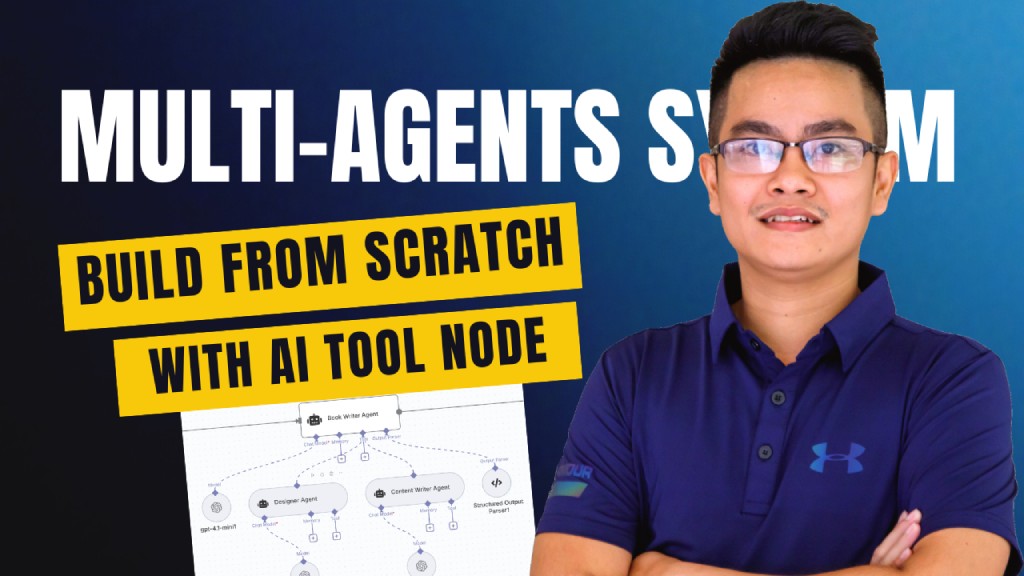
Multi-Agent Book Creation Workflow with AI Tool Node and GPT-4, DALL-E
Who’s it for
This workflow is designed for:
- Content creators who want to generate books or structured documents automatically.
- Educators and trainers who need quick course materials, eBooks, or study guides.
- Automation enthusiasts exploring multi-agent systems using the newly released AI Tool Node in n8n.
- Developers looking for a reference template to understand orchestration of multiple AI agents with structured output.
How it works / What it does
This template demonstrates a multi-agent orchestration system powered by AI Tool Nodes:
- Trigger: Workflow starts when a chat message is received.
- Book Brief Agent: Generates the initial book concept (title, subtitle, and outline).
- Book Writer Agent: Expands the outline into full content by collaborating with two sub-agents:
- Designer Agent → Provides layout/design suggestions.
- Content Writer Agent → Drafts and refines chapters.
- Generate Cover Image: AI generates a custom book cover image.
- Upload to AWS S3: Stores the cover image securely.
- Configure Metadata: Adds metadata for title, author, and description.
- Build Book HTML: Converts markdown-based content into HTML format.
- Upload to Google Drive: Saves the HTML content for processing.
- Convert to PDF: Transforms the book into a professional PDF.
- Archive to Google Drive: Final version is archived for safe storage.
This workflow showcases multi-agent coordination, structured parsing, and seamless integration with cloud storage services.
How to set up
- Import the workflow into n8n.
- Configure the following connections:
- OpenAI (for Book Brief, Book Writer, Designer, and Content Writer Agents).
- AWS S3 (for image storage).
- Google Drive (for document storage & archiving).
- Add your API keys and credentials in n8n credentials manager.
- Test the workflow by sending a sample chat message (e.g., “Write a book about AI in education”).
- Verify outputs in Google Drive (HTML + PDF) and AWS S3 (cover image).
Requirements
- n8n (latest version with AI Tool Node support).
- OpenAI API key (to power multi-agent models).
- AWS account (with S3 bucket for storing images).
- Google Drive integration (for document storage and archiving).
- Basic familiarity with workflow setup in n8n.
How to customize the workflow
- Switch Models: Replace
gpt-4.1-miniwith other models (faster, cheaper, or more powerful). - Add More Agents: Introduce agents for editing, fact-checking, or translation.
- Change Output Format: Export to EPUB, DOCX, or Markdown instead of PDF.
- Branding Options: Modify the cover generation prompt to include company logos or specific style.
- Extend Storage: Add Dropbox, OneDrive, or Notion integration for additional archiving.
- Trigger Alternatives: Replace chat trigger with form submission, webhook, or schedule-based runs.
✅ This workflow acts as a free, plug-and-play template to showcase how multi-agents + AI Tool Node can work together to automate complex content creation pipelines.
You may also like


New to n8n?
Need help building new n8n workflows? Process automation for you or your company will save you time and money, and it's completely free!


