Daily Stock Market Report with Twelve Data API Sent via WhatsApp and Email


Last edited 205 days ago
This workflow automates the generation of a daily stock market report, identifying the top gainers and losers among the top 100 stocks. It fetches real-time stock data, processes it to highlight significant price movements, and delivers formatted alerts via WhatsApp and email.
Quick Notes
- Ensure the Twelve Data API key and stock symbols are correctly configured.
- Verify recipient lists for WhatsApp and email alerts are up-to-date.
- Confirm the workflow triggers at 5:00 PM (IST) from Monday to Friday.
Process Flow
- Trigger the workflow daily at 5:00 PM (IST) with the
Daily Market Change Triggernode. - Configure API key, stock symbols, and alert recipients using the
Configuration Variablesnode. - Fetch stock data from Twelve Data API with the
Fetch Stock Data from Twelve Datanode. - Process stock data to identify top gainers and losers with the
Process Stock Movementsnode. - Format WhatsApp messages with the
Format WhatsApp Messagenode. - Send WhatsApp alerts with the
Send WhatsApp Alertnode. - Format email content with the
Format Email Contentnode. - Send email alerts with the
Send Email Alertnode.
Output
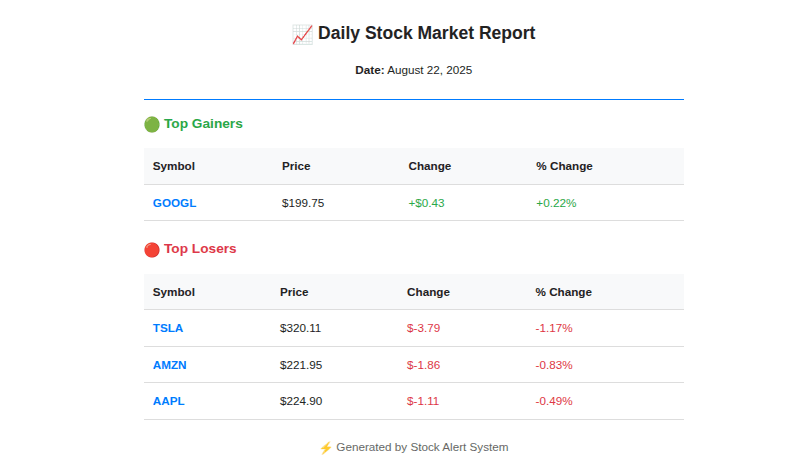
Getting Started
- Import the workflow into n8n and configure Twelve Data API credentials.
- Set up WhatsApp and email service integrations.
- Run a test execution to ensure data fetching and alert delivery work as expected.
Tailored Adjustments
- Adjust the
Process Stock Movementsnode to change the number of top gainers/losers. - Modify the
Configuration Variablesnode to include additional stock symbols or recipient lists.
You may also like
New to n8n?
Need help building new n8n workflows? Process automation for you or your company will save you time and money, and it's completely free!


