Document Q&A System with OpenAI GPT, Pinecone Vector DB & Google Drive Integration


Categories
Created by
moMohan GopalLast edited 205 days ago
This workflow contains community nodes that are only compatible with the self-hosted version of n8n.
🤖 AI-Powered Document QA System using Webhook, Pinecone + OpenAI + n8n
This project demonstrates how to build a Retrieval-Augmented Generation (RAG) system using n8n, and create a simple Question Answer system using Webhook to connect with User Interface (created using Lovable):
🧾 Downloads the pdf file format documents from Google Drive (contract document, user manual, HR policy document etc...)
📚 Converts them into vector embeddings using OpenAI
🔍 Stores and searches them in Pinecone Vector DB
💬 Allows natural language querying of contracts using AI Agents
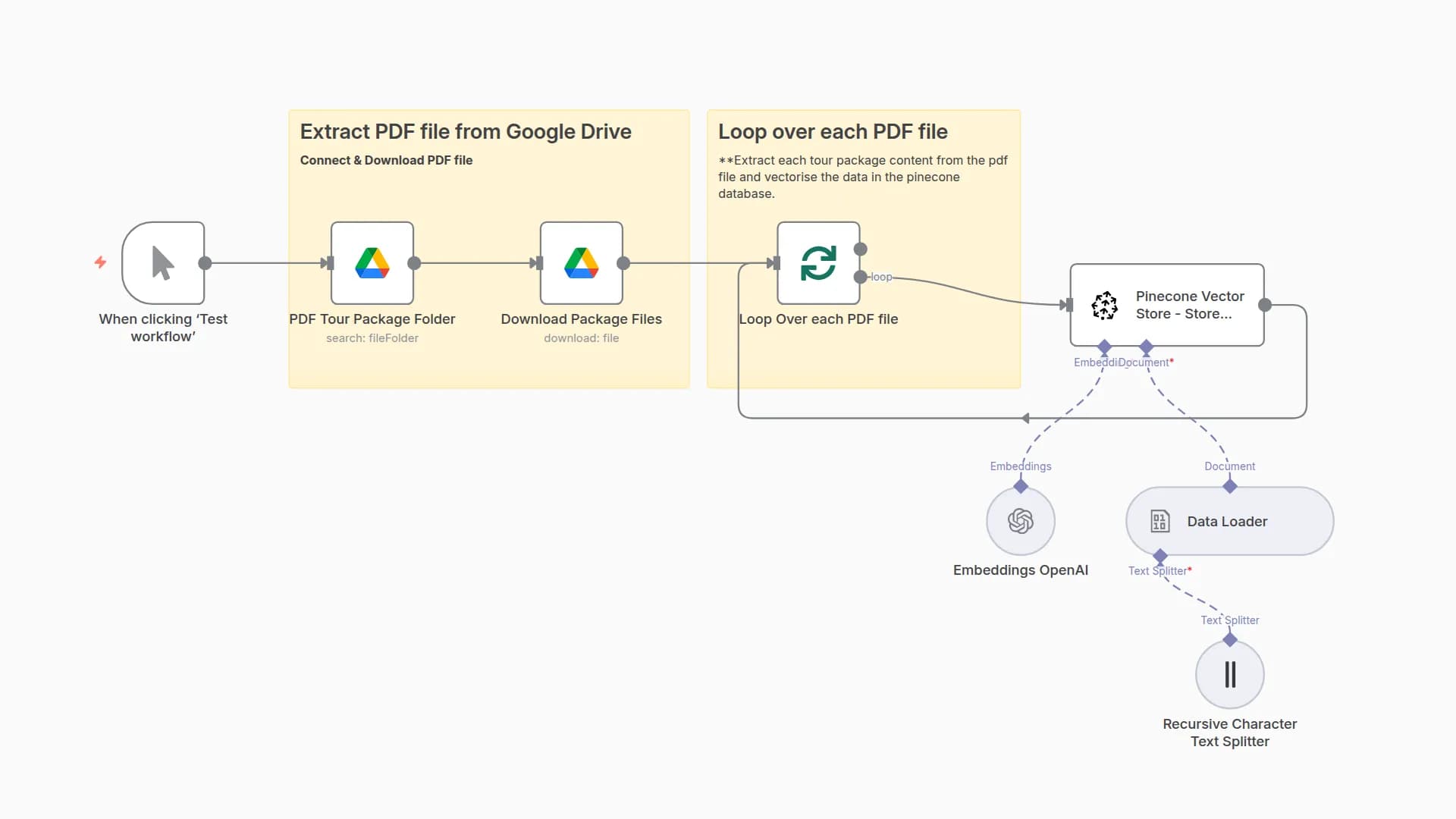
📂 Flow 1: Document Loading & RAG Setup
This flow automates:
Reading documents from a Google Drive folder
Vectorizing using text-embedding-3-small
Uploading vectors into Pinecone for later semantic search
🧱 Workflow Structure
A [Manual Trigger] --> B[Google Drive Search]
B --> C[Google Drive Download]
C --> D[Pinecone Vector Store]
D --> E[Default Data Loader]
E --> F[Recursive Character Text Splitter]
E --> G[OpenAI Embedding]
🪜 Steps
Manual Trigger: Kickstarts the workflow on demand for loading new documents.
Google Drive Search & Download
Node: Google Drive (Search: file/folder)
Downloads PDF documents
Apply Recursive Text Splitter: Breaks long documents into overlapping chunks
Settings:
Chunk Size: 1000
Chunk Overlap: 100
OpenAI Embedding
Model: text-embedding-3-small
Used for creating document vectors
Pinecone Vector Store
Host: url
Index: index
Batch Size: 200
Pinecone Settings:
Type: Dense
Region: us-east-1
Mode: Insert Documents
💬 Flow 2: Chat-Based Q&A Agent
This flow enables chat-style querying of stored documents using OpenAI-powered agents with vector memory.
🧱 Workflow Diagram
A[Webhook (chat message)] --> B[AI Agent]
B --> C[OpenAI Chat Model]
B --> D[Simple Memory]
B --> E[Answer with Vector Store]
E --> F[Pinecone Vector Store]
F --> G[Embeddings OpenAI]
🪜 Components
Chat (Trigger): Receives incoming chat queries
AI Agent Node
Handles query flow using:
Chat Model: OpenAI GPT
Memory: Simple Memory
Tool: Question Answer with Vector Store
Pinecone Vector Store: Connected via same embedding index as Flow 1
Embeddings: Ensures document chunks are retrievable using vector similarity
Response Node: Returns final AI response to user via webhook
🌐 Flow 3: UI-Based Query with Lovable
This flow uses a web UI built using Lovable to query contracts directly from a form interface.
📥 Webhook Setup for Lovable
Webhook Node
Method: POST
URL:url
Response: Using 'Respond to Webhook' Node
🧱 Workflow Logic
A[Webhook (Lovable Form)] --> B[AI Agent]
B --> C[OpenAI Chat Model]
B --> D[Simple Memory]
B --> E[Answer with Vector Store]
E --> F[Pinecone Vector Store]
F --> G[Embeddings OpenAI]
B --> H[Respond to Webhook]
💡 Lovable UI
Users can submit:
Full Name
Email
Department
Freeform Query: User can enter any freeform query.
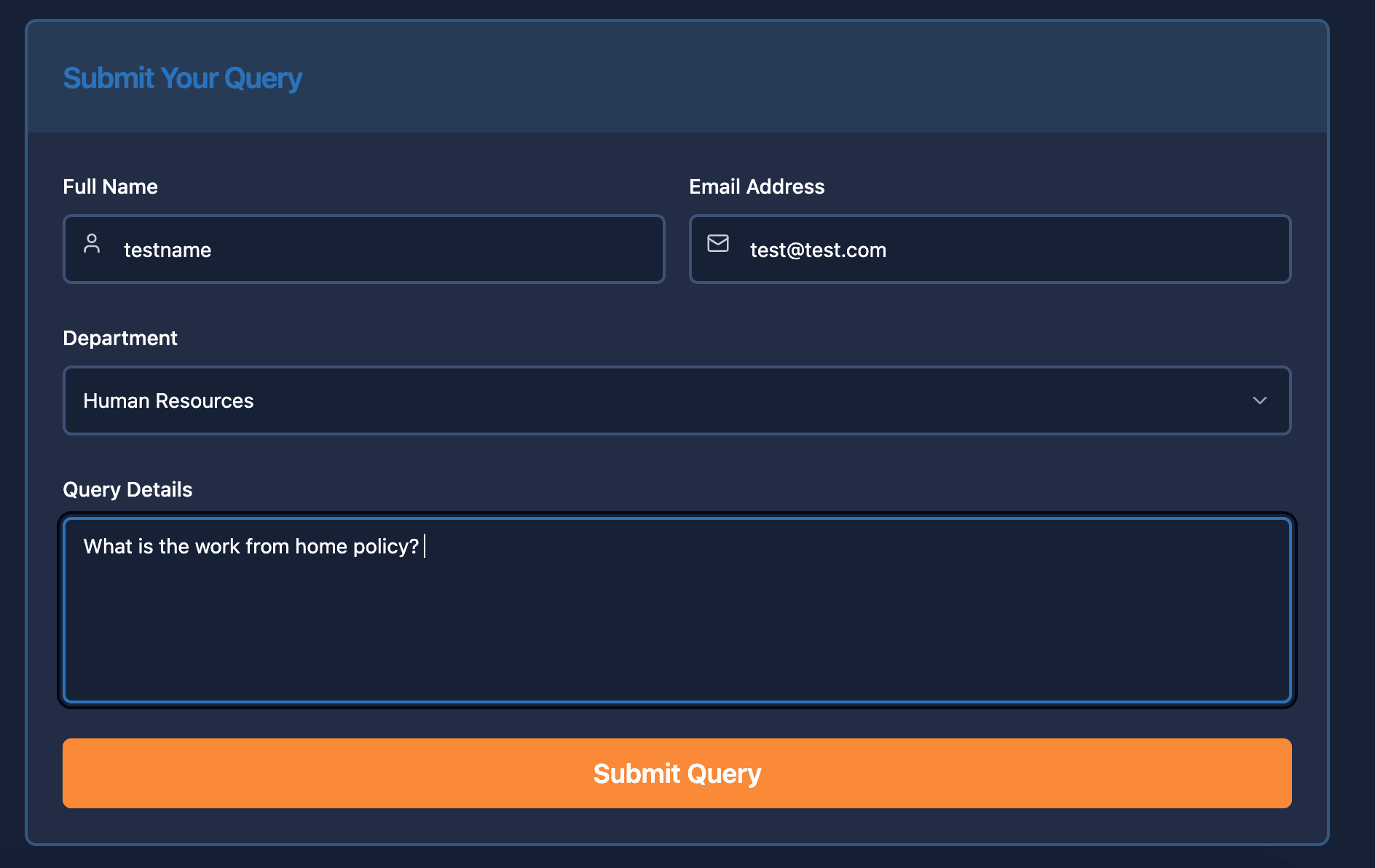
Data is sent via webhook to n8n and responded with the answer from contract content.
🔍 Use Cases
Contract Querying for Legal/HR teams
Procurement & Vendor Agreement QA
Customer Support Automation (based on terms)
RAG Systems for private document knowledge
⚙️ Tools & Tech Stack
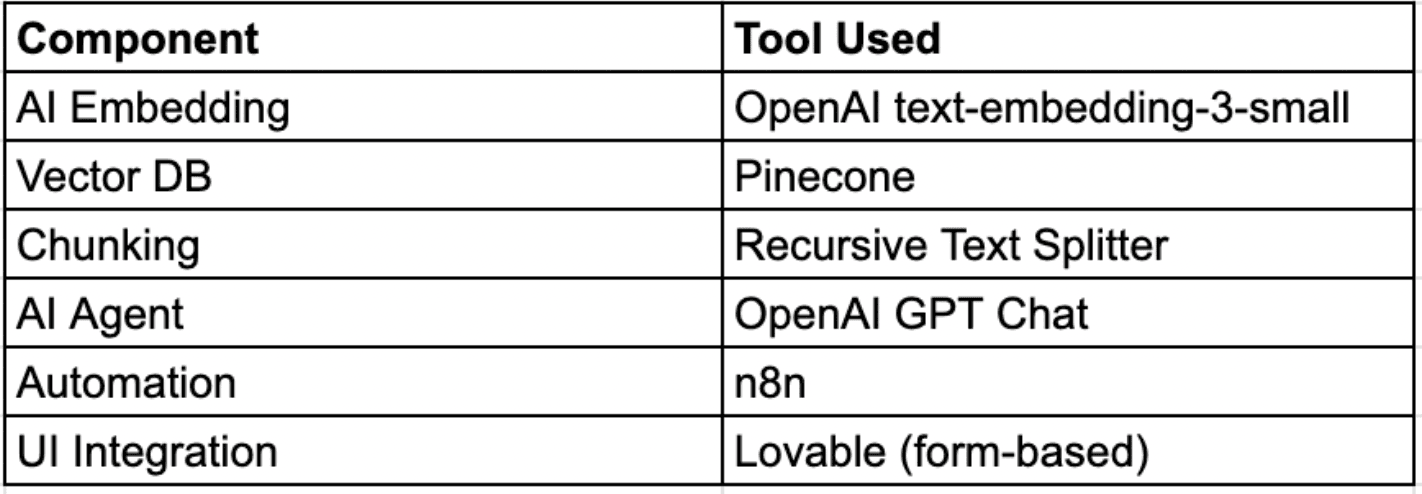
📌 Final Notes
Pinecone Index: package1536
Dimension: 1536
Chunk Size: 1000, Overlap: 100
Embedding Model: text-embedding-3-small
Feel free to fork the workflow or request the full JSON export.
Looking forward to your suggestions and improvements!
You may also like
New to n8n?
Need help building new n8n workflows? Process automation for you or your company will save you time and money, and it's completely free!


