Download Slideshare Presentations to Google Drive with RapidAPI Integration


Last edited 206 days ago
📥 Download Slideshare and Store in Drive
⚙️ Automate the download of Slideshare presentations and save them to Google Drive using the Slideshare Downloader Pro API.
🔄 Workflow Overview: Node by Node
-
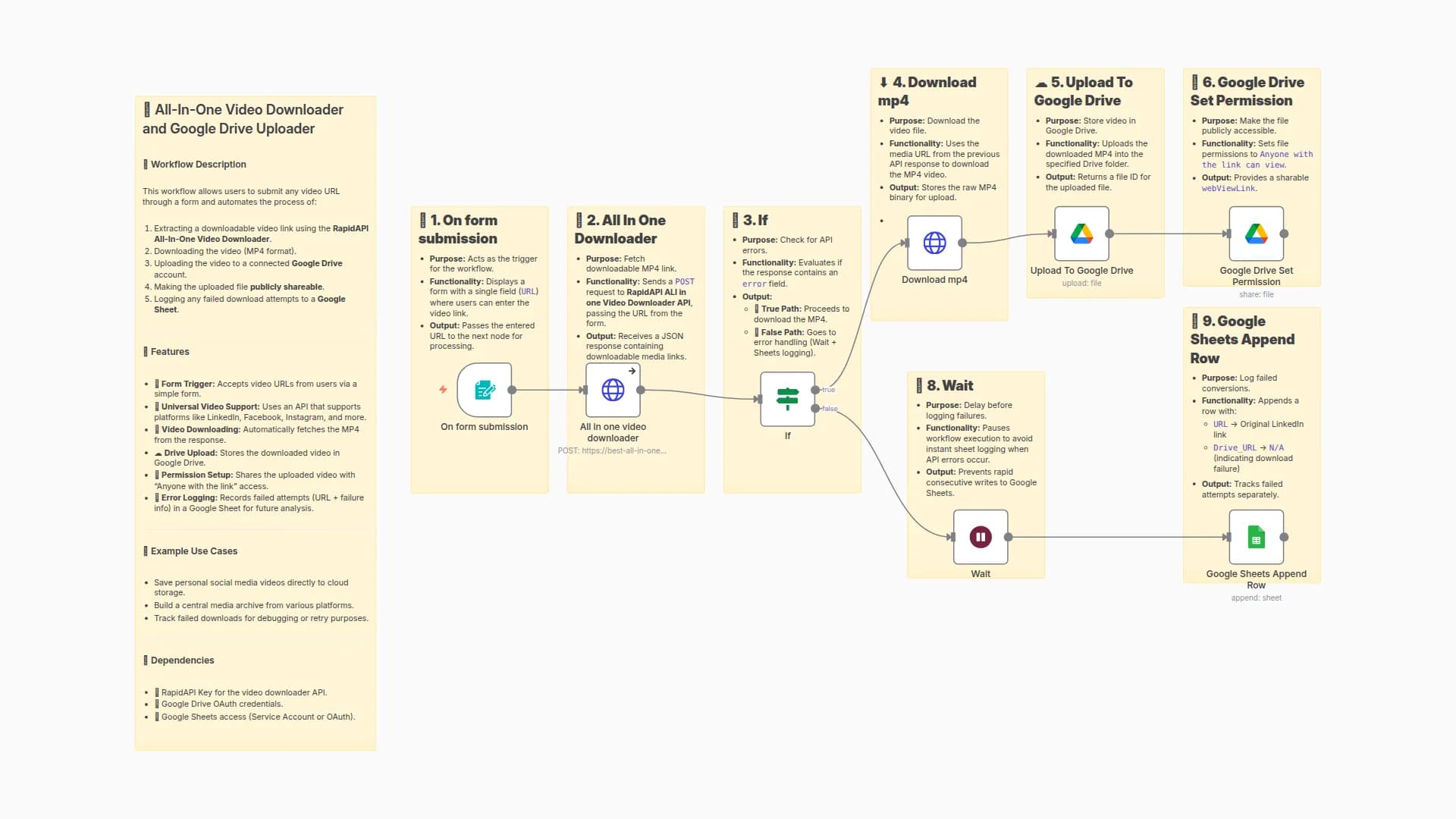
📝 On Form Submission
→ Displays a form for users to input the Slideshare URL. -
🌐 Slideshare Downloader
→ Sends the submitted URL to the Slideshare Downloader Pro API to fetch a downloadable PDF link. -
✅ If (API Success?)
→ Checks if the API response returns a200status (success). -
⬇️ Download PDF
→ Downloads the actual PDF file from the media URL received in the API response. -
☁️ Upload to Google Drive
→ Uploads the downloaded PDF into a specific Google Drive folder. -
🔓 Google Drive Set Permission
→ Sets the file’s permission to "Anyone with the link can view". -
⏱️ Wait (Error Handling)
→ Adds a small delay before logging errors to prevent rapid multiple logs. -
📄 Google Sheets Append Row
→ Logs failed attempts with the original Slideshare URL and "N/A" for tracking.
💡 Use Case
A content curator or student often downloads Slideshare presentations for archiving, referencing, or sharing.
Instead of repeatedly copy-pasting URLs, downloading files, and uploading them manually, this automated workflow streamlines the process from input to storage.
It leverages the Slideshare Downloader Pro API to handle the heavy lifting — ensuring reliable PDF extraction.
✅ Benefits
- 🕒 Save Time: Automates multi-step tasks in one seamless flow.
- 📂 Organized Storage: PDFs are directly saved in Google Drive with public access enabled.
- 📉 Track Failures: Failed downloads are logged for review via Google Sheets.
- 🔗 Easy Sharing: Uploaded files are made instantly accessible via shareable links.
- 🧩 API Integration: Integrates smoothly with the Slideshare Downloader Pro API, ensuring robust and scalable automation.
🔑 How to Get API Key from RapidAPI Slideshare Downloader Pro
Follow these steps to get your API key and start using it in your workflow:
-
Visit the API Page
👉 Click here to open Slideshare Downloader Pro API on RapidAPI -
Log in or Sign Up
- Use your Google, GitHub, or email account to sign in.
- If you're new, complete a quick sign-up.
-
Subscribe to a Pricing Plan
- Go to the Pricing tab on the API page.
- Select a plan (free or paid, depending on your needs).
- Click Subscribe.
-
Access Your API Key
- Navigate to the Endpoints tab.
- Look for the
X-RapidAPI-Keyunder Request Headers. - Copy the value shown — this is your API key.
-
Use the Key in Your Workflow
-
In your n8n workflow (HTTP Request node), replace:
"x-rapidapi-key": "your key"with:
"x-rapidapi-key": "YOUR_ACTUAL_API_KEY"
-
You may also like

New to n8n?
Need help building new n8n workflows? Process automation for you or your company will save you time and money, and it's completely free!


