Generate AI Images with APImage and Upload to Google Drive


Last edited 206 days ago
AI Image Generator Workflow
This workflow lets you automatically generate AI images with the APImage API 🡥, download the generated image, and upload it to any serivce you want (e.g., Google Drive, Notion, Social Media, etc.).
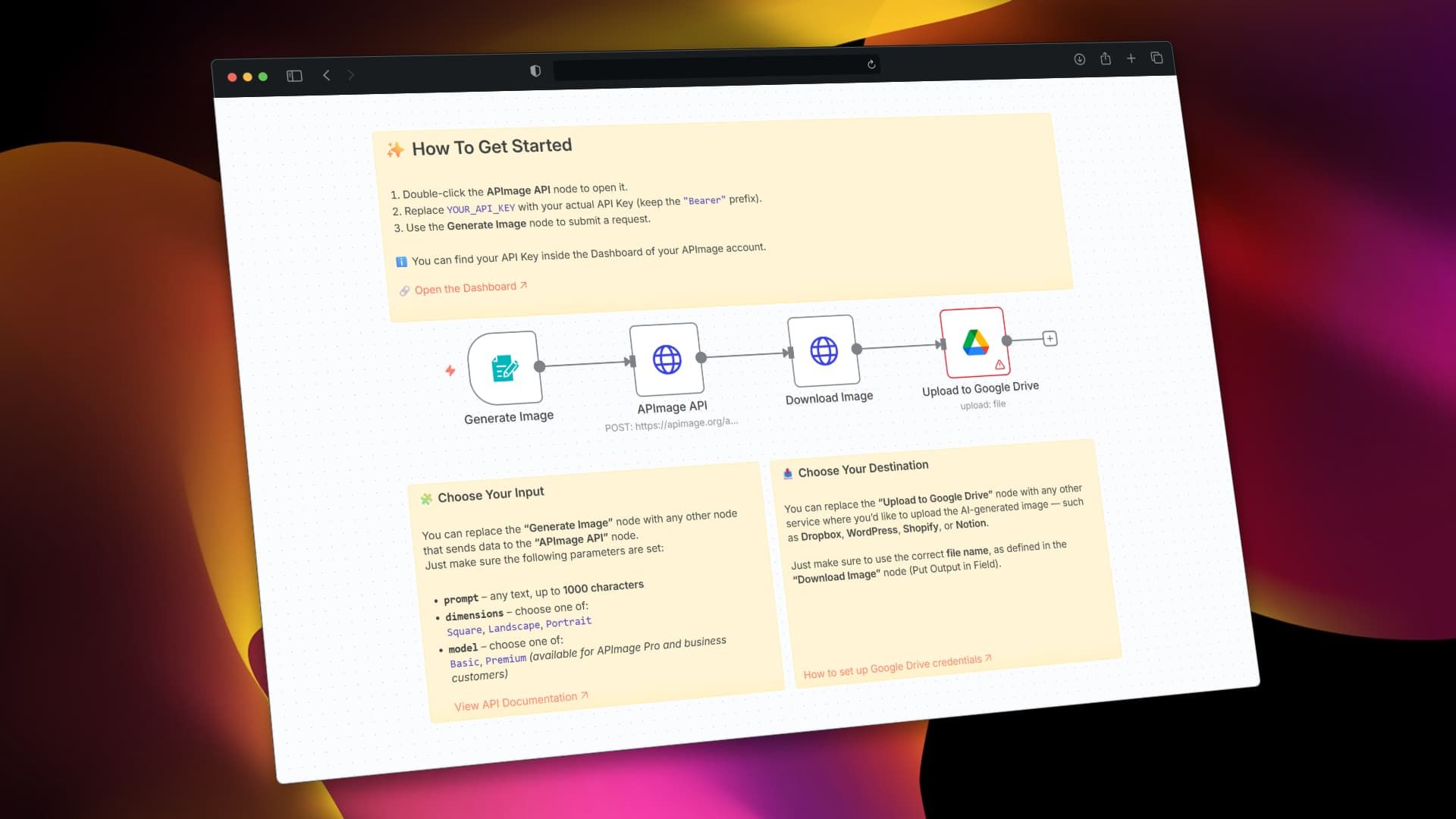
🧩 Nodes Overview
1. Generate Image (Trigger)
This node contains the following fields:
- Image Prompt: (text input)
- Dimensions:
Square,Landscape,Portrait - AI Model:
Basic,Premium
This acts as the entry point to your workflow.
It collects input and sends it to the APImage API node.
Note: You can swap this node with any other node that lets you define the parameters shown above.
2. APImage API (HTTP Request)
This node sends a POST request to:
https://apimage.org/api/ai-image-generate
The request body is dynamically filled with values from the first node:
{
  "prompt": "{{ $json['Describe the image you want'] }}",
  "dimensions": "{{ $json['Dimensions'] }}",
  "model": "{{ $json['AI Model'] }}"
}
✅ Make sure to set your API Key in the Authorization header like this:
Bearer YOUR_API_KEY
🔐 You can find your API Key in your APImage Dashboard 🡥
3. Download Image (HTTP Request)
Once the image is generated, this node downloads the image file using the URL returned by the API:
{{ $json.images[0] }}
The image is stored in the output field: generated_image
4. Upload to Google Drive
This node takes the image from the generated_image field and uploads it to your connected Google Drive.
📁 You can configure a different target folder or replace this node with:
- Dropbox
- WordPress
- Notion
- Shopify
- Any other destination
Make sure to pass the correct filename and file field, as defined in the "Download Image" node.
Set up Google Drive credentials 🡥
✨ How To Get Started
- Double-click the APImage API node.
- Replace
YOUR_API_KEYwith your actual key (keepBearerprefix). - Open the Generate Image node and test the form.
🔧 How to Customize
- Replace the Form Trigger with another node if you're collecting data elsewhere (e.g., via Airtable, Notion, Webhook, Database, etc.)
- Modify the Upload node if you'd like to send the image to other tools like Slack, Notion, Email, or an S3 bucket.
📚 API Docs & Resources
🖇️ Node Connections
Generate Image → APImage API → Download Image → Upload to Google Drive
✅ This template is ideal for:
- Content creators automating media generation
- SaaS integrations for AI tools
- Text-to-image pipelines
You may also like

New to n8n?
Need help building new n8n workflows? Process automation for you or your company will save you time and money, and it's completely free!


