Generate Custom Cake Images with OpenAI GPT & Replicate Flux Schnell


Last edited 206 days ago
Who’s it for
This template is designed for bakeries, event planners, and e-commerce platforms that want to automatically generate custom cake designs. It’s also ideal for marketers or digital creators who need personalized celebratory visuals for social media or email campaigns.
How it works
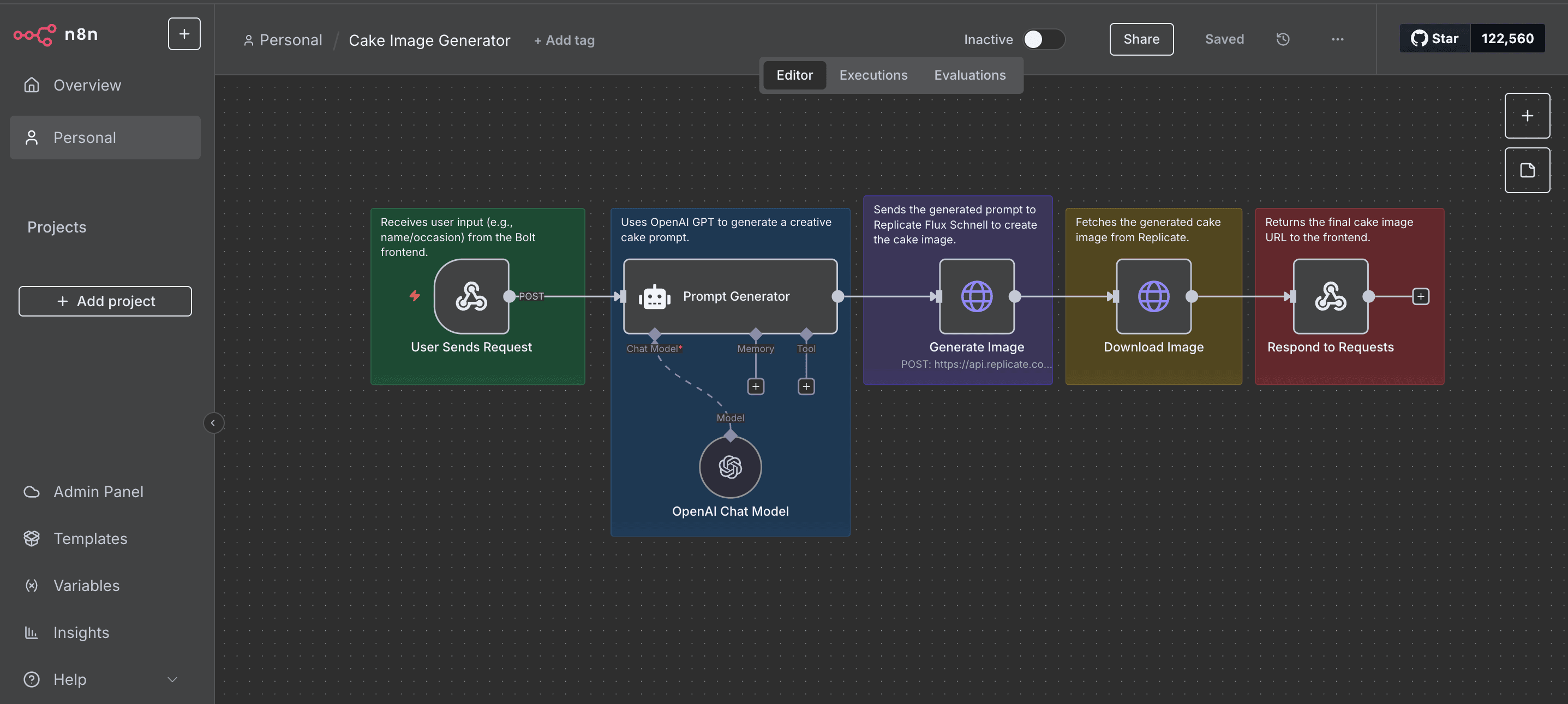
This workflow converts simple user input (e.g., “Sarah’s Birthday”) into a creative cake design:
- Webhook: Captures user input from the Bolt frontend form.
- OpenAI GPT: Generates a detailed and creative cake design prompt.
- Replicate Flux Schnell: Produces a unique cake image using the AI-generated prompt.
- HTTP Response: Sends the final cake image back to the frontend.
How to set up
- Import this template into n8n.
- Add your OpenAI API Key under n8n Credentials for the OpenAI Chat Model node.
- Add your Replicate API Token as an HTTP Header Auth credential (do not hardcode it).
- Update the Webhook node URL in the Bolt frontend form to send a
POSTrequest to n8n. - (Optional) Customize the OpenAI prompt in the Prompt Generator node to adjust cake style, colors, or decorations.
Requirements
- n8n account (cloud or self-hosted).
- OpenAI API Key for prompt generation.
- Replicate API Token for AI image generation.
- A Bolt frontend or any form that can call the webhook endpoint.
How to customize the workflow
- Replace "cake" with any product type (e.g., mugs, greeting cards, or T-shirts).
- Add a database node (Google Sheets or Supabase) to log user requests and images.
- Implement input moderation by adding an OpenAI moderation node before the prompt generation.
 Frontend
You may also like
New to n8n?
Need help building new n8n workflows? Process automation for you or your company will save you time and money, and it's completely free!


