Generate & Publish AI News Avatar Videos with HeyGen and Blotato


Last edited 205 days ago
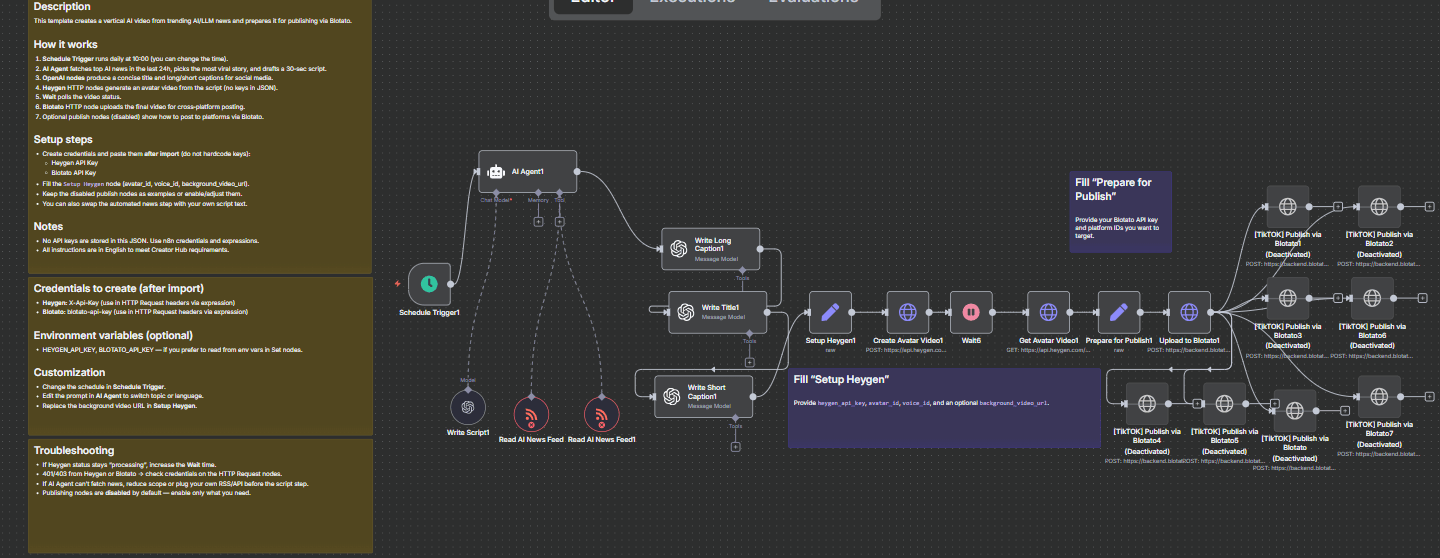
How it works
Schedule Trigger — runs daily at 10:00 (adjustable).
RSS Feed Read — collects fresh AI/LLM news from multiple feeds.
AI Agent — analyzes news, picks the most viral story, and drafts a 30-second script.
OpenAI nodes — create:
a short, catchy video title
a short caption for social media
a long caption with hashtags
HeyGen API — generates a vertical avatar video (9:16) using your selected avatar_id, voice_id, and optional background video.
Wait node — checks the processing status of the video.
Blotato API — uploads the video and captions for publishing.
Optional publish nodes — preconfigured for TikTok, Instagram, YouTube, Facebook, etc. (disabled by default).
Requirements
n8n v1.105.4+ (cloud or self-hosted)
HeyGen account with API key + avatar_id + voice_id
Blotato account with API key and platform IDs
Setup steps
Import the workflow into n8n.
Create credentials in n8n (⚠ do not hardcode keys):
HeyGen API Key
Blotato API Key
Open the Setup Heygen node:
Paste your heygen_api_key
Add your avatar_id and voice_id
Optionally change background_video_url
Open the Prepare for Publish node:
Paste your blotato_api_key
Add IDs for TikTok, YouTube, Instagram, etc.
Adjust the Schedule Trigger to your preferred time/frequency.
(Optional) Enable the publish nodes if you want direct uploads to your platforms.
Customization
Topic — edit the AI Agent’s prompt to switch from AI/LLM news to any topic (crypto, marketing, tech, etc.).
Language — update prompts for different output languages.
Visuals — replace the HeyGen avatar, voice, or background video for a different look.
Publishing — connect only the social platforms you actually use.
You may also like
New to n8n?
Need help building new n8n workflows? Process automation for you or your company will save you time and money, and it's completely free!


