GPT-4o, RunwayML, ElevenLabs for Social Media


Categories
Created by
moMohan GopalLast edited 206 days ago
🎥 AI Tour Video Generator with GPT-4o, RunwayML & ElevenLabs for Social Media'
This n8n workflow generates 20-second faceless videos for social media by combining AI-generated images, audio, and video clips for a given tour destination.
The output is a ready-to-publish video file, which can be pushed to social platforms and logged in a tracking sheet.
⚙️ Workflow Overview
This system is divided into 4 main sections:
- 🧠 Generate Image Prompts
- 🎨 Generate Media (Images, Videos, Audio)
- 🛠️ Render & Upload
- 📈 Future Enhancements
🔌 Integration Setup Table
Integration
Service Used
Setup Instruction
OpenAI
GPT-4o (Prompt Generation)
Get API Key and configure in n8n
Google Sheet
Idea I/O tracking
Connect Google account with OAuth/Credentials in n8n
Piapia API
AI Image Generation
Sign up at piapia.ai and get API key
Runway API
AI Video Generation
Register at runwayml.com for access
ElevenLabs
AI Voice Generation
Sign up at elevenlabs.io for API key
CreateMate API
Render Final Video
Visit createmate.ai to access API
Google Drive
Upload/Share Final Video
Use n8n Google Drive node to configure credentials
✅ Required Services & Tools
Ensure you have active accounts with the following tools and services:
- ✅ OpenAI (GPT-4o + Embeddings)
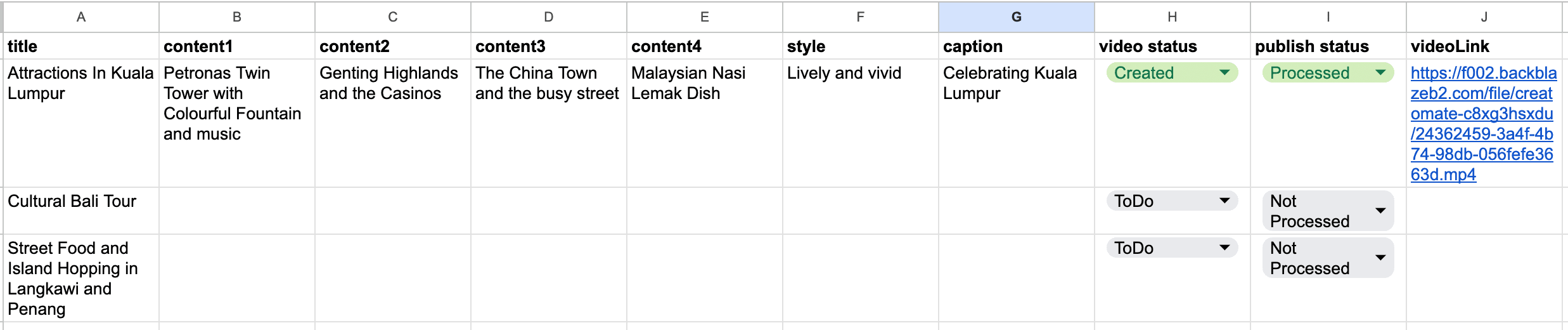
- ✅ Google Sheets (for destination ideas and tracking)
- ✅ Piapia API (Image generation)
- ✅ RunwayML API (Video generation)
- ✅ ElevenLabs API (Voiceover TTS)
- ✅ Google Drive (Storage & Sharing)
- ✅ CreateMate (Video Rendering)
- ✅ Social Media Scheduler (Optional - Zapier, Buffer, Make.com)
🧠 1. Generate Image Prompts
Purpose: Prepares the content idea and generates visual prompts.
Step
Node Name
Function
🔁 Trigger
Schedule or Manual
Starts the workflow
📥 Grab Idea
Read Sheet
Pulls destination idea from Google Sheet
✍️ Set Content
Manual Input
Adds structure/narrative to the idea
🔀 Split
Split Out
Breaks input into chunks
🤖 GPT Agent
Image Prompt Agent
Uses GPT-4o to generate creative image prompts
🧹 Clean
Remove \n
Cleans up formatting
📌 Save
Set Prompts
Finalizes prompts for next stage
🖼️ 2. Generate Media
🎨 Generate Images
Step
Function
Generate Image
Calls Piapia API with AI-generated prompts
Wait
Adds delay for rendering (90 sec)
Get Images
Retrieves final images for video
🎥 Generate Videos
Step
Function
Generate Video
Calls RunwayML to generate video clips from the prompts
Wait
2-minute delay to allow video generation
Get Videos
Fetches completed video clips
🔊 Generate Audio
Step
Function
Update Status
Logs progress in Google Sheet
Sound Agent
Gemini or GPT generates narration text
Set Audio
Formats narration for voice synthesis
Generate Audio
Uses ElevenLabs for realistic voiceover
Upload to Drive
Saves final audio to Google Drive
Share File
Creates sharable URL for audio file
🛠️ 3. Render & Upload
Purpose: Combines all elements (image, video, audio) into a single output and prepares for social media.
Step
Function
Merge
Combines images, videos, and audio
Split Out Parts
Breaks content for rendering
Render Video
Uses CreateMate to render the final 20-second video
Wait
Short delay to complete rendering
Download Video
Saves output video locally or on Drive
Update Sheet
Logs final video URL/status in Google Sheet
Social Upload
(Coming Soon) Post to Instagram, YouTube Shorts, TikTok, etc.
🧩 Pre-Conditions
Before running the workflow:
- ✅ Google Sheet should be created with destination ideas
- ✅ All API keys must be configured in n8n
- ✅ Google Drive folder must exist for output videos
- ✅ Sufficient credit/quota must be available on AI platforms
- ✅ Internet access must be stable for external API calls
🚀 Outcome
- A polished 20-second travel destination video
- Combines AI visuals, short clips, and AI narration
- Ready for instant social media upload
- Fully automated from idea to video file
🧠 Tech Stack Summary
Component
Tools Used
Language Model
GPT-4o (OpenAI), Gemini (Google)
Image Generator
Piapia API
Video Generator
RunwayML
Audio Generator
ElevenLabs
Storage
Google Drive
Video Composer
CreateMate API
Orchestration
n8n
📈 Future Enhancements
✅ Smart Enhancements
- Dynamic hashtags & captions via AI
- Auto-post to TikTok, Instagram, YouTube via Buffer/Zapier
- Scene detection + matching B-roll
- Multilingual narration (e.g., Arabic, French, Malay)
- A/B testing of video versions to analyze performance
🧪 Testing Add-ons
- Add preview screen before upload
- Error tracking & retry flow
- Manual override before publishing
🧰 Customization Guide
Element
How to Customize
✏️ Prompt Format
Change structure inside Set Content or Prompt Agent
🌍 Destination Ideas
Modify Google Sheet for different destinations/categories
🎨 Image Style
Customize prompt to Piapia (e.g., “in Pixar style”, “3D render”)
🎙️ Voiceover Script
Adjust tone/structure in the Sound Agent
📆 Posting Schedule
Use Zapier/Buffer for timed posting
🎯 Target Duration
Adjust number of clips or frame duration
🙌 Community Value
This workflow is ideal for:
- 📸 Travel content creators
- 🌍 Destination marketers
- 🏛️ Tourism boards
- 🧳 Travel SMEs looking for automation
Feel free to fork, remix, or request a JSON export in the comments below!
You may also like
New to n8n?
Need help building new n8n workflows? Process automation for you or your company will save you time and money, and it's completely free!


