Human in the Loop Email Response System (AI + IMAP)


Created by
yaYatharth ChauhanLast edited 206 days ago
How it works
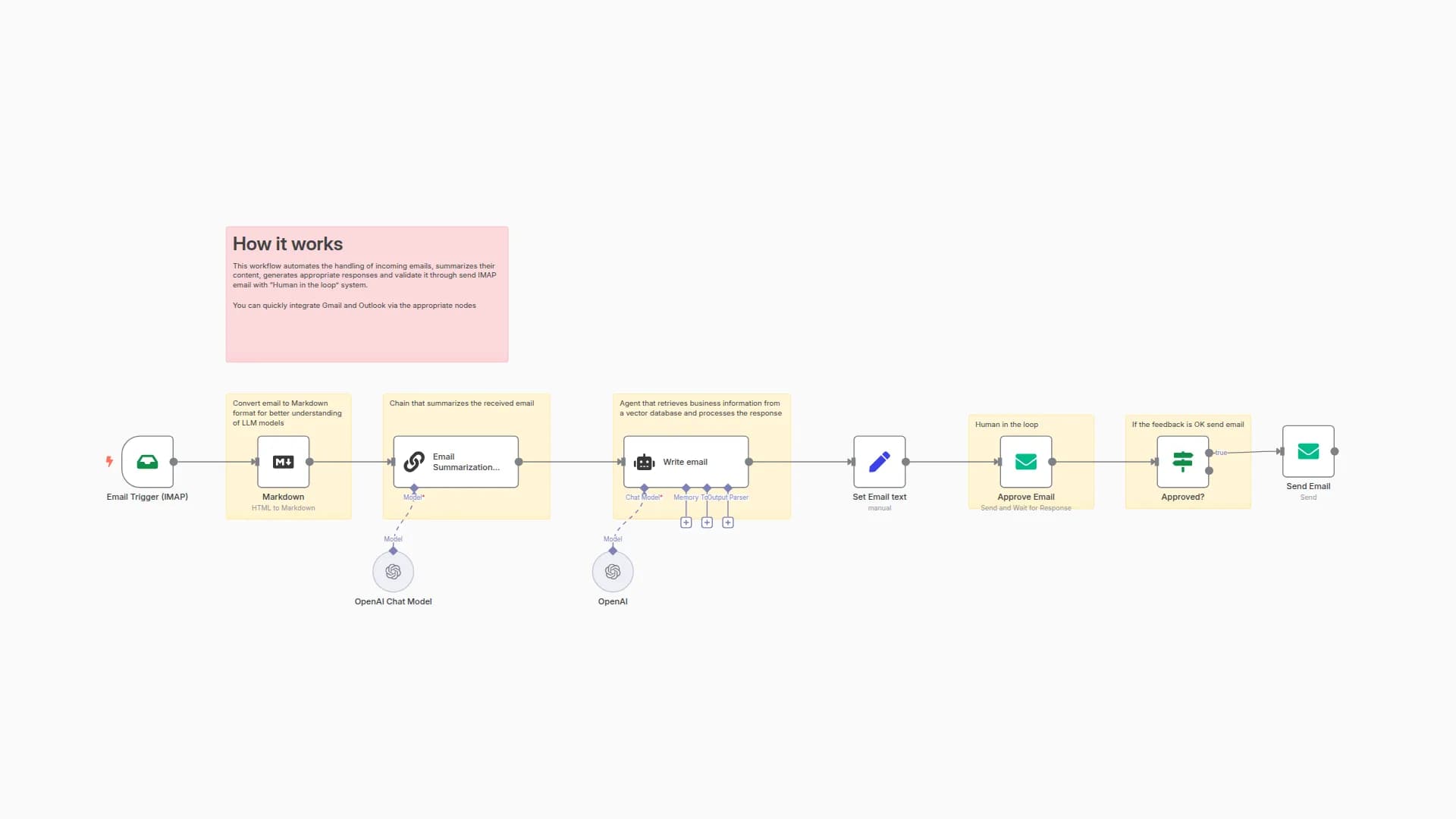
This workflow automates the process of handling incoming emails by:
- Receiving emails via IMAP.
- Converting the email to Markdown for better AI understanding.
- Summarizing the email using an AI model.
- Drafting a professional reply with AI, based on the summary.
- Requesting human approval for the AI-generated response.
- Sending the approved reply back to the original sender.
Set up steps
Estimated time: 10–20 minutes (excluding credential setup)
What you’ll need:
- IMAP credentials for your email inbox
- SMTP credentials for sending emails
- OpenAI (or compatible) API key for AI steps
Setup outline:
- Add your IMAP and SMTP credentials to the workflow.
- Connect your OpenAI (or compatible) account for AI summarization and reply generation.
- Deploy the workflow in n8n and activate it.
- Test by sending an email to your connected inbox.
Note:
Detailed configuration tips and explanations are included as sticky notes inside the workflow for each step.
You may also like
New to n8n?
Need help building new n8n workflows? Process automation for you or your company will save you time and money, and it's completely free!


