Intelligent Gmail Label Management with AI & Discord Notifications


Last edited 206 days ago
How it works
- This workflow will trigger upon new mail in your gmail inbox and will automatically apply existing labels OR identify, create, then apply up to 5 new labels.
- This is currently set up to run using a OpenAI endpoint which I have set up connected to my local llama.cpp server running.
- After your email is done labeling, the workflow will send you a nice notification in your discord channel!
Set up Instructions
- This workflow requires a Gmail OAuth account credential with the ability to create labels and label messages
- [OPTIONAL] You can create a Discord Bot Account which connects with a Bot Token which will summarize the email and show you which labels were created and added in the workflow.
- You might want to tweak the prompts a bit based on how detailed you want your labels. I've found after running it for a bit that the labels that get created mostly encompass everything I want.
Workflow Hints
- The workflow works in 5 phases
-- Phase 1: Find existing Gmail labels as options for the LLM to choose from.
-- Phase 2: LLM chooses labels or defines new ones
-- Phase 3: Create additional Gmail labels if needed
-- Phase 4: Label the message with newly created and existing labels
-- Phase 5: Rewrite and send a message notification via Discord.
Screenshot 1:

Note: colors are my own
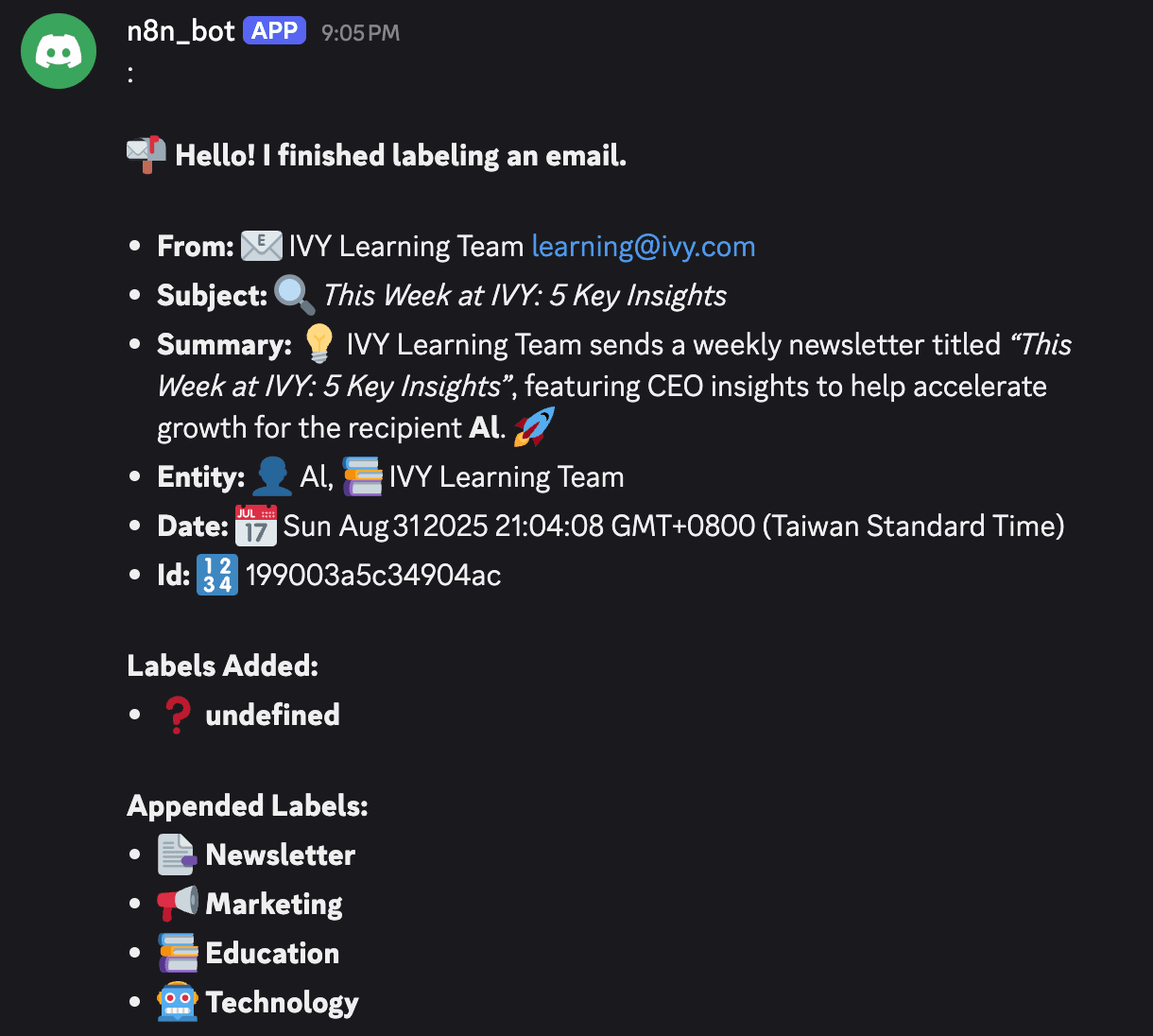
Screenshot of notification sent via discord
Model Tips
- I set this up to run completely using offline models. I had good success with Llama.cpp server with gpt-oss-20B and with a bit more tweaking could get it to work with a smaller gemma3-4b model mostly likely as well.
- The whole workflow runs in about 5-10 seconds on my Blackwell Nvidia GPU. Probably would be a few seconds slower on an older piece of hardware.
You may also like
New to n8n?
Need help building new n8n workflows? Process automation for you or your company will save you time and money, and it's completely free!


