Monetize Workflows with x402 Payment Protocol and 1Shot API


Last edited 223 days ago
Monetize Your n8n Workflow with x402
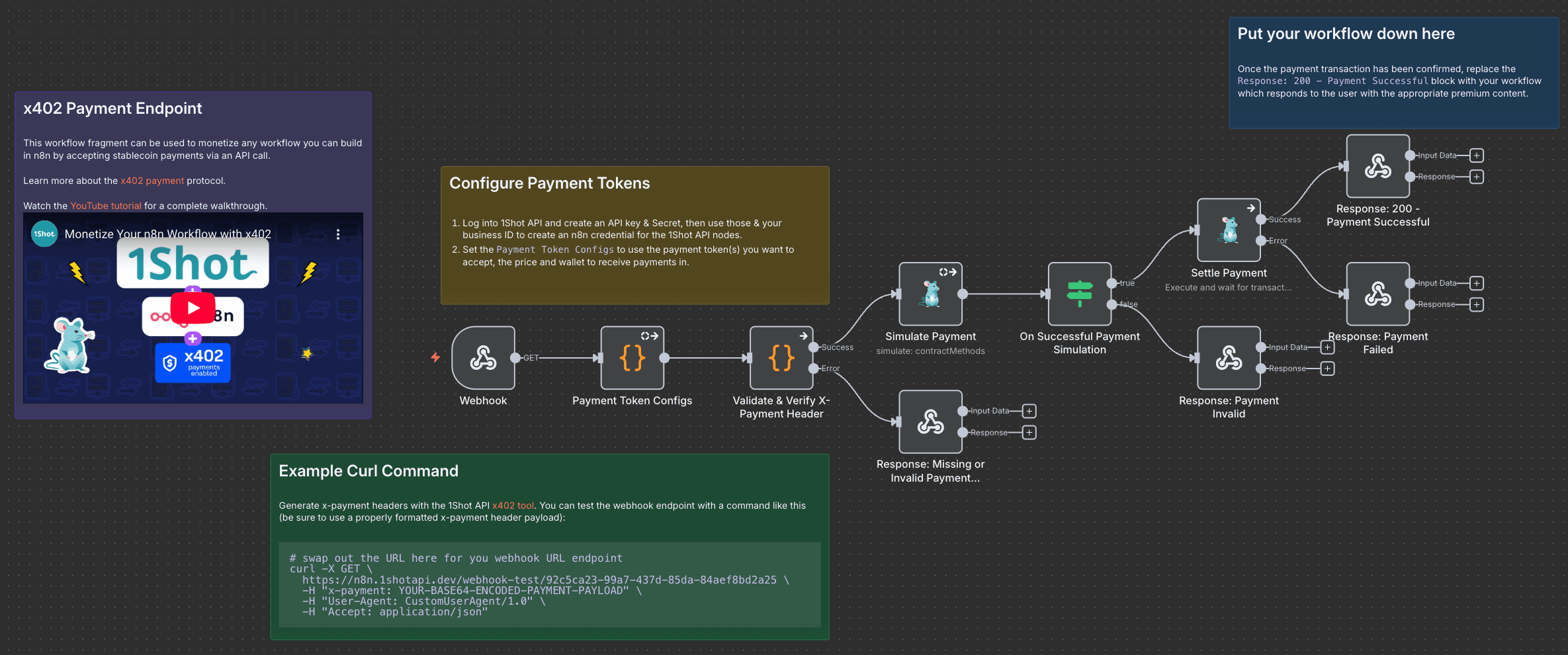
This workflow lets you monetize any n8n workflow with the x402 payment protocol.
It uses 1Shot API as the onchain transaction fascilitator role.
Check out the tutorial video for a complete walkthrough.
Setup
- Create a free 1Shot API account, then go to the API Keys tab and generate a new API key & secret.
- Click on one of the 1Shot API nodes and use the API key & secret from step 1 to create a credentail. You'll need you 1Shot API business ID as well which is located in the top right-hand corner of the 1Shot API dashboard.
- Click on the
Payment Token Configsbox and enter in the required token information for the x402-compatible tokens you want to accept as payment. Import the x402-compatible tokens you want to accept as payments into your 1Shot API account using the 1Shot Prompts directory. - Click on the webhook trigger node and set the route.
You may also like

New to n8n?
Need help building new n8n workflows? Process automation for you or your company will save you time and money, and it's completely free!


