Restaurant Reservation Management with OpenAI GPT and Google Sheets

Created by
faFakhar KhanLast edited 206 days ago
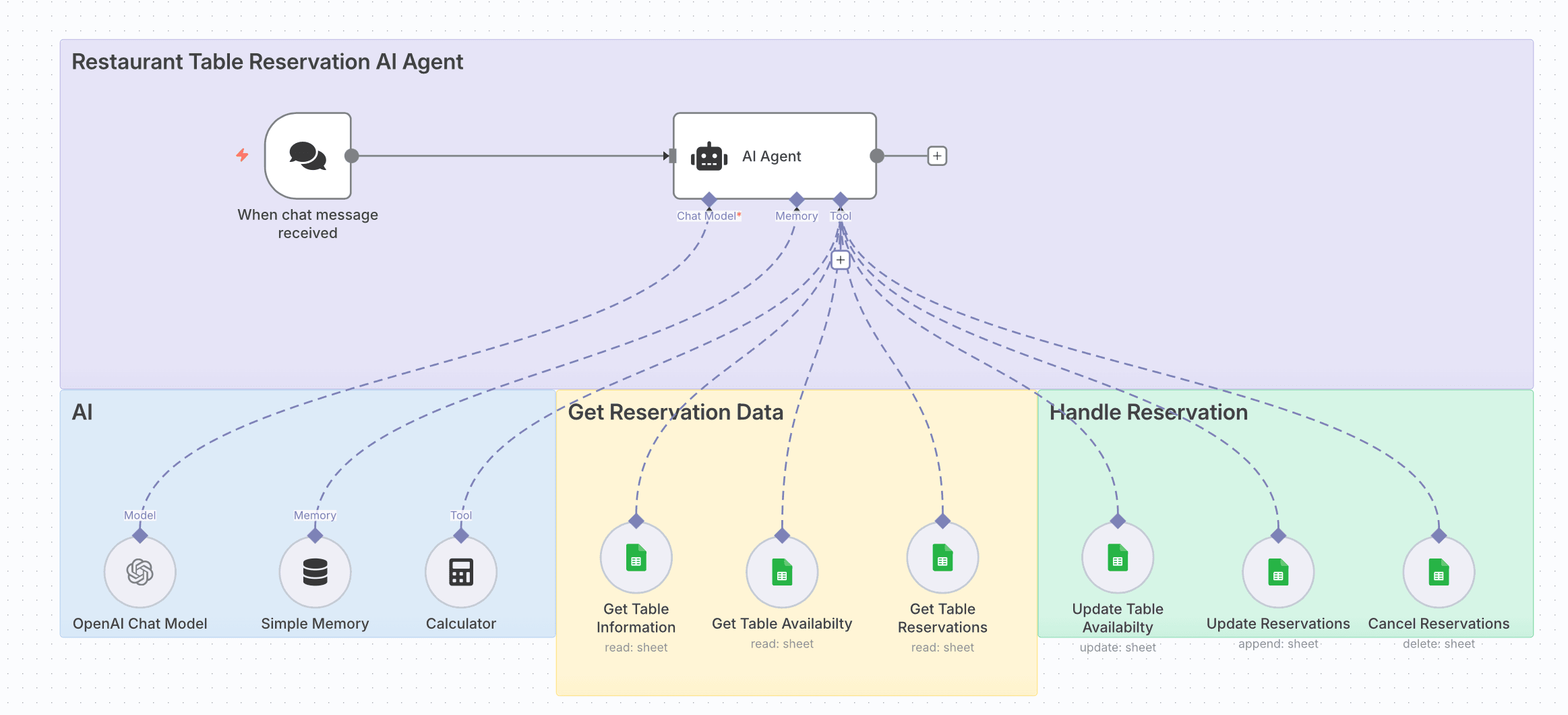
How it works
- Receives chat messages from customers requesting table reservations.
- Uses an AI Agent with OpenAI Chat Model to understand and process requests.
- Checks table information, availability, and existing reservations from Google Sheets.
- Calculates guest counts and reservation timing using the Calculator node.
- Updates table availability and reservation records in real-time.
- Handles reservation changes, including updates and cancellations.
Set up steps
- Add credentials for OpenAI (Chat Model) and Google Sheets.
- In the AI Agent node, link:
- Chat Model → OpenAI Chat Model node.
- Memory → Simple Memory node.
- Tools → Calculator and Google Sheets nodes for reservation data handling.
- Configure Google Sheets nodes:
- Get Table Information (read sheet)
- Get Table Availability (read sheet)
- Get Table Reservations (read sheet)
- Update Table Availability (update sheet)
- Update Reservations (append sheet)
- Cancel Reservations (delete sheet)
- Ensure your sheets have consistent column names for table IDs, dates, times, and guest counts.
- Test by sending a reservation request through the chat trigger and verify updates in the Google Sheets.
You may also like


New to n8n?
Need help building new n8n workflows? Process automation for you or your company will save you time and money, and it's completely free!


