Salesforce to S3 File Migration & Cleanup


Last edited 206 days ago
Salesforce to S3 File Migration & Cleanup
Automate archiving old Salesforce files to Amazon S3, log them back in Salesforce, and free up org storage — all from a scheduled n8n workflow.
🔧 How It Works (High-Level)
- Schedule Trigger kicks off (e.g., daily).
- Query Salesforce for
ContentDocumentrecords older than 365 days. - Loop Each File → download binary via REST.
- Upload to S3 with the original filename.
- Lookup Links (
ContentDocumentLink) to keep the parent record reference. - Filter Out Users (ignore
LinkedEntityIdstarting with005). - Create
S3_File__crecord in Salesforce for traceability. - Delete Original File from Salesforce to reclaim storage.
- Notify via Slack when the batch is done.
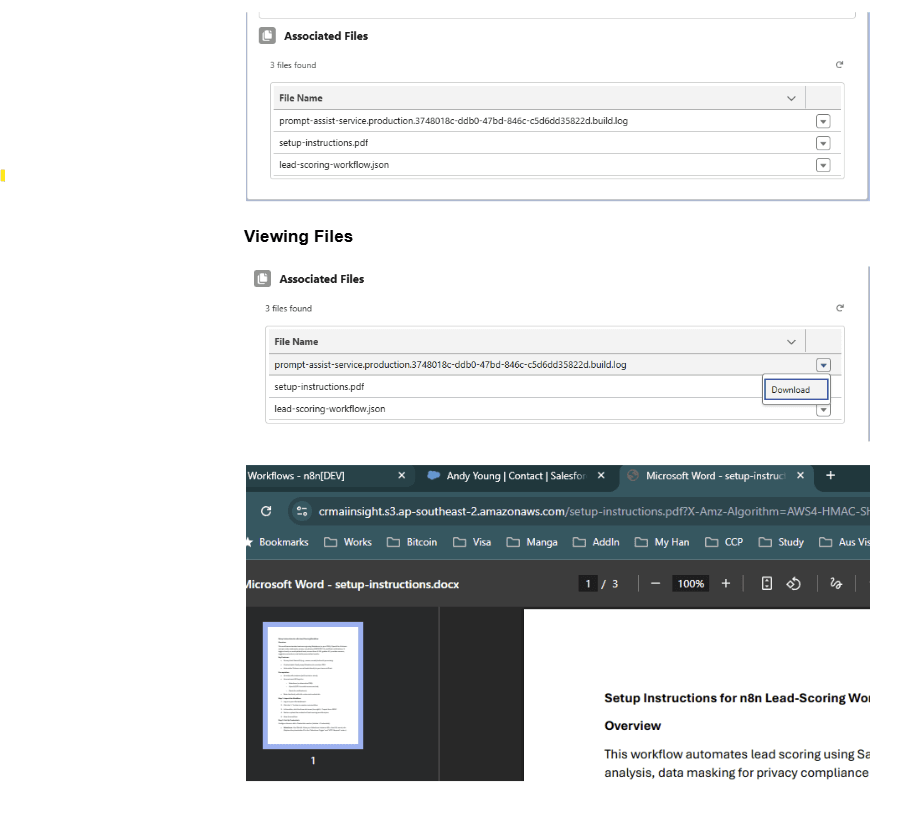
🚀 Set Up Steps (Time: ~45–90 mins)
- Import n8n Workflow JSON and wire up credentials (Salesforce OAuth2, AWS S3, Slack).
- Install Salesforce Unmanaged Package (Custom Object
S3_File__c, Apex controller, LWC, settings). - Fill
S3Settings__c(bucket, region, keys, expiry) or swap to Named Credentials. - Test with a Sandbox Batch (e.g., small date range) and verify upload/delete.
- Schedule & Monitor (tweak interval, Slack channel).
💖 Why you’ll love it
- 💸 Slash storage costs — offload gigabytes to S3
- 🔍 Full traceability — every file still tracked in Salesforce
- 🧰 Plug & play — import JSON, install package, plug in creds
- 🧱 Modular & extensible — swap S3, add approvals, build an uploader UI
- ⏱ Set it & forget it — scheduled automation + Slack alerts
📦 What’s Included
- n8n JSON Flow – ready to import.
- Salesforce Unmanaged Package – Apex (
S3FilesController.cls), LWC (s3FilesViewer),S3_File__c,S3Settings__c. - S3 + Salesforce Setup Guide – quick reference for configuring keys, permissions, and the LWC.
All components are editable — extend, replace, or integrate with your own processes.
🧱 Requirements
- n8n instance (self-hosted or Cloud) with HTTP Request, AWS S3, Slack, and Salesforce nodes.
- Salesforce org with API access & permission to install unmanaged packages.
- You have to have Query All Files permission. Setup-> Permission Sets / Profile -> App Permission -> Content -> Query All Files. Allows View All Data users to SOQL query all files in the org.
- AWS S3 bucket + IAM user/role with
GetObject/PutObject(and optionalListBucket).
You may also like

New to n8n?
Need help building new n8n workflows? Process automation for you or your company will save you time and money, and it's completely free!


