Search and Compare Flights with DeepSeek AI and Google Flights API

Last edited 206 days ago
This workflow contains community nodes that are only compatible with the self-hosted version of n8n.
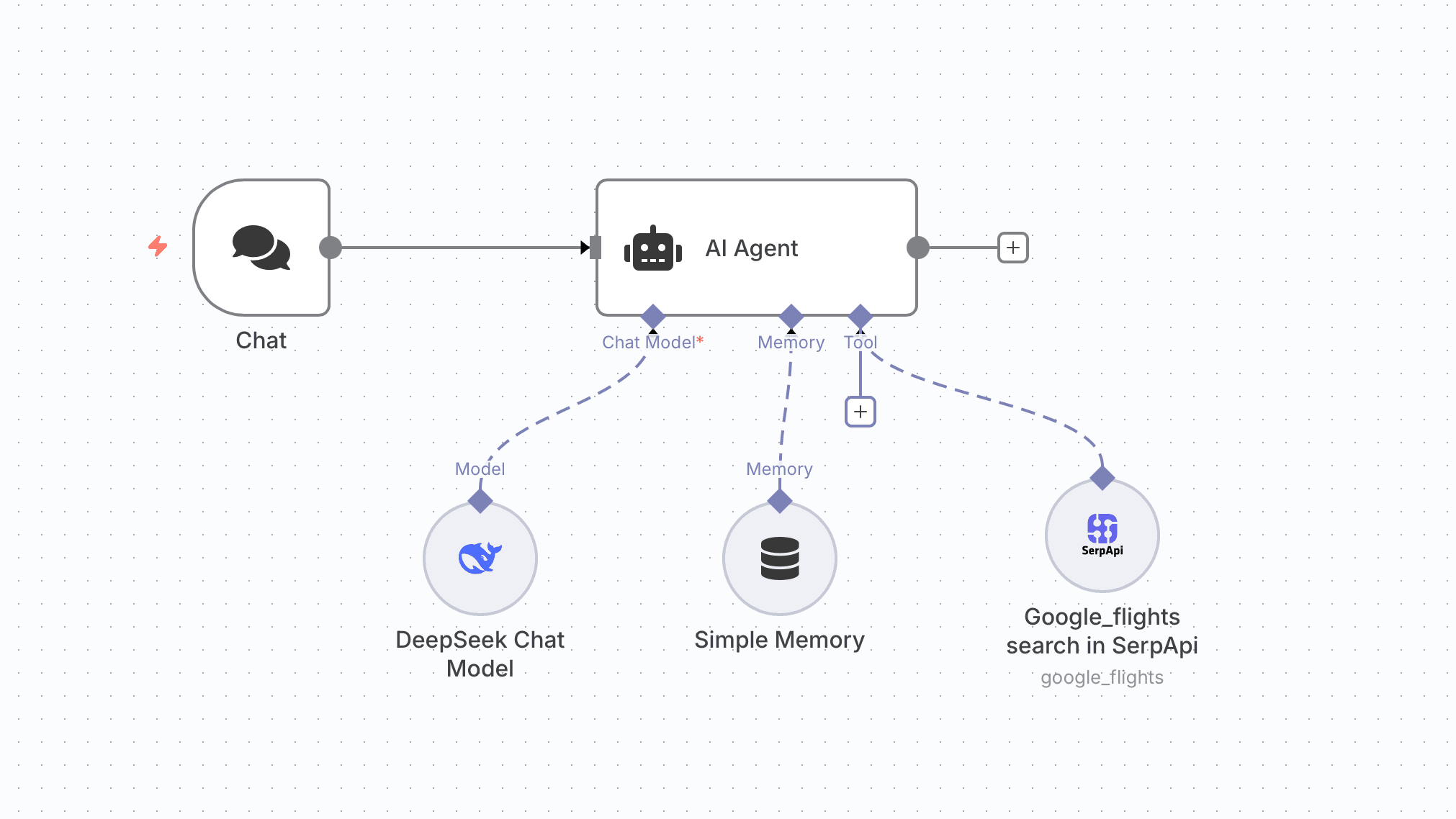
How it works
- Takes departure city, destination, and travel dates from the user.
- Searches multiple airlines for flight options and compares price, duration, and stops.
- Suggests flexible travel dates for better deals.
- Tracks selected flights and sends real-time price alerts.
- Provides 24/7 AI-powered travel recommendations.
Set up steps
- Add credentials for your chosen Chat Model (DeepSeek in this case) and SerpAPI (Google Flights).
- In the AI Agent node, link:
- Chat Model → DeepSeek Chat Model node.
- Memory → Simple Memory node (for conversation context).
- Tool → Google_flights search in SerpApi node.
- In the SerpApi node, set
engine=google_flightsand map input fields for departure, destination, and travel dates. - Test the workflow by providing a sample itinerary request in the Chat node’s input.
- Review AI responses to ensure it searches, compares, and returns relevant flight options.
You may also like

New to n8n?
Need help building new n8n workflows? Process automation for you or your company will save you time and money, and it's completely free!


