Send Preventive Maintenance Schedules with Google Sheets and Gmail ICS Invites


Last edited 205 days ago
🗓 Preventive Maintenance Scheduler via ICS Email (n8n | Google Sheets | Gmail)
This workflow automatically reads your daily preventive maintenance schedule from Google Sheets and sends each assigned team member a personalized calendar invite (.ICS) as an email attachment. No more manual reminders or copying events — your operations and field teams will always be on schedule with clear, actionable reminders!
Who’s it For
- Maintenance teams at plants, renewable sites, factories.
- Facility and operations managers.
- Any field crew, service team or org using Google Sheets and email for coordination.
- Businesses wanting reliable, zero-touch preventive maintenance notifications.
How it Works
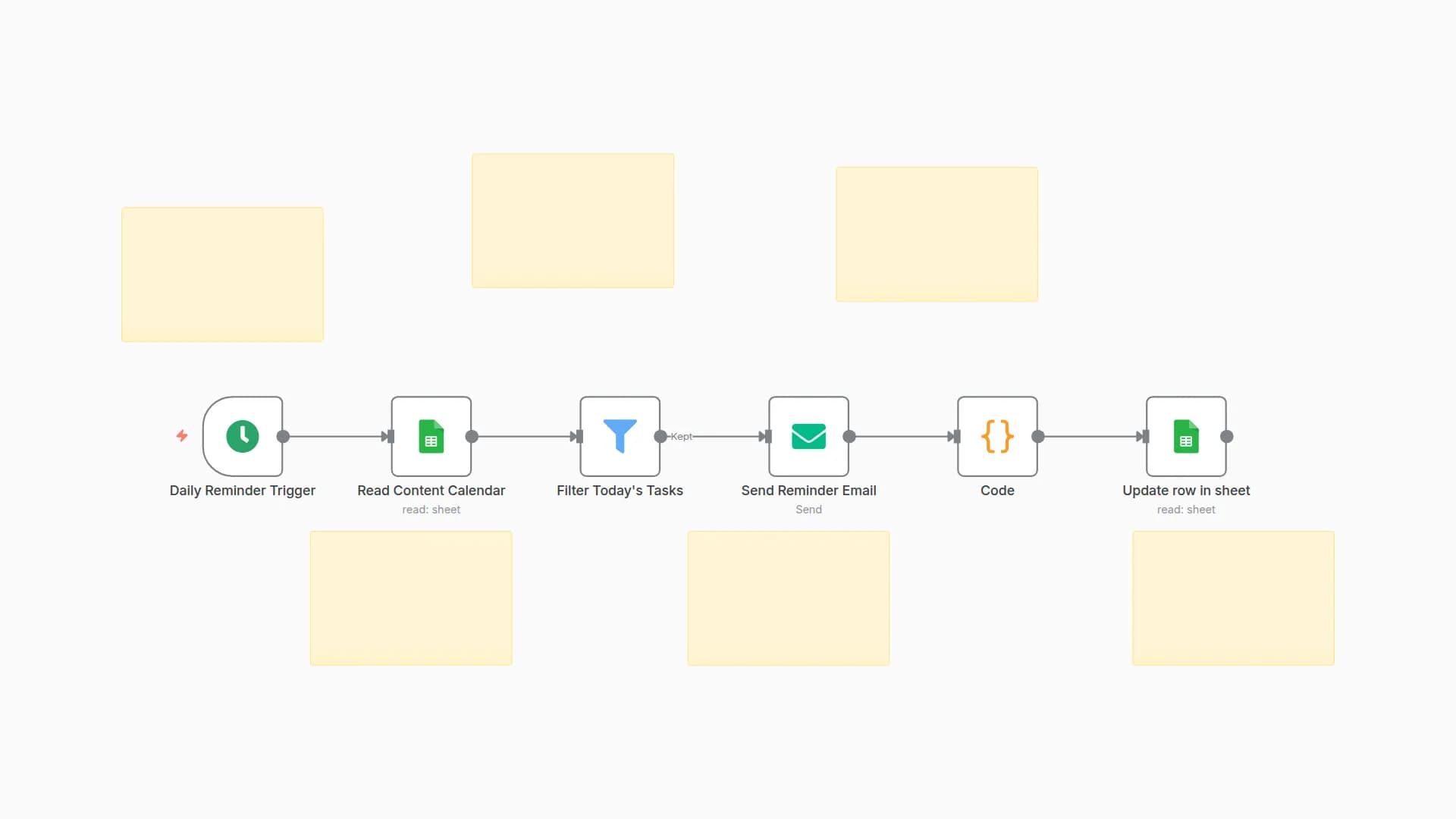
- Daily Trigger: Workflow runs automatically every morning at 7:00 AM.
- Read Maintenance Tasks: Pulls all scheduled maintenance for today from Google Sheets.
- Generate ICS Data: Prepares universal calendar event details: summary, location, time, assignee, etc.
- Create ICS File: Converts event data into a standard
.icscalendar invite file with correct timings and description. - Send Calendar Invite Email: Sends a personalized email to each assignee, with the
.icsfile attached — ready to add to Outlook, Gmail or mobile calendar.
How to Set Up
- Import the workflow JSON into your n8n instance.
- Set up connections in n8n:
- Authenticate Google Sheets (read access) and Gmail (send access).
- Format your Google Sheet with headers:
date,asset,task,location,email - Activate the workflow. It runs daily on schedule. You can test it manually for validation.
- Each day: Team members with tasks scheduled for that date are sent their personalized event invite.
Requirements
Tool
Purpose
n8n Instance
Run and schedule the automation
Google Sheets
Source of maintenance schedule/tasks
Gmail (or SMTP)
Email platform to send calendar files
How to Customize
Customization
How
Change calendar invite/event wording
Edit title or description in the "Create ICS File" node
Adjust event start/end times
Modify time logic in "Generate ICS Data" node
Change daily send time
Tweak time in "Daily Trigger" node
Use a different email provider (SMTP)
Swap Gmail node for SMTP node; link correct credentials
Add extra notifications (SMS/Slack)
Add appropriate node after or before Send Email node
Add‑ons
Add-on
Description
Recurring Tasks
Automate repeated tasks via your sheet/setup
Email Logging
Log sent invites in another sheet/db
WhatsApp/SMS Alerts
Add Twilio or WhatsApp for instant alerts
Manager Summary
Send daily reports or dashboards to leads
Pre-alerts
Add reminder emails 1hr / 1 day before event
Use Case Examples
- Wind turbine engineers receive daily calendar invites for inspections.
- Solar O&M operators are automatically reminded for inverter cleaning via calendar sync.
- Facility staff gets scheduled reminders for HVAC or safety checks without manual admin.
- Managers have a clear audit trail of which reminders were sent on time.
Common Troubleshooting
Issue
Possible Cause
Solution
No email received
Gmail/SMTP misconfigured
Check node credentials, token or SMTP settings
Calendar file comes as .txt
Wrong file type/extension/MIME
Ensure "Create ICS File" outputs .ics and text/calendar
No invites sent for today
No matching rows in Google Sheet
Check date/value format; add sample data for today
Google Sheets returns error
Wrong Sheet ID/tab, access issue
Confirm correct Google Sheet is linked and shared
Event time/zone is incorrect
Code node’s time logic not matching
Adjust start/end time settings in the code node
Need Help?
Want guided setup, advanced reporting, Outlook synchronization or a full preventive maintenance dashboard?
👉 Contact WeblineIndia — Your n8n Automation partner for smart preventive maintenance and calendar-driven ops!
You may also like

New to n8n?
Need help building new n8n workflows? Process automation for you or your company will save you time and money, and it's completely free!


