SEO Competitor Analysis with RapidAPI and Google Sheets Logging


Last edited 206 days ago
Automated SEO Competitor Analysis with Google Sheets Logging
Description:
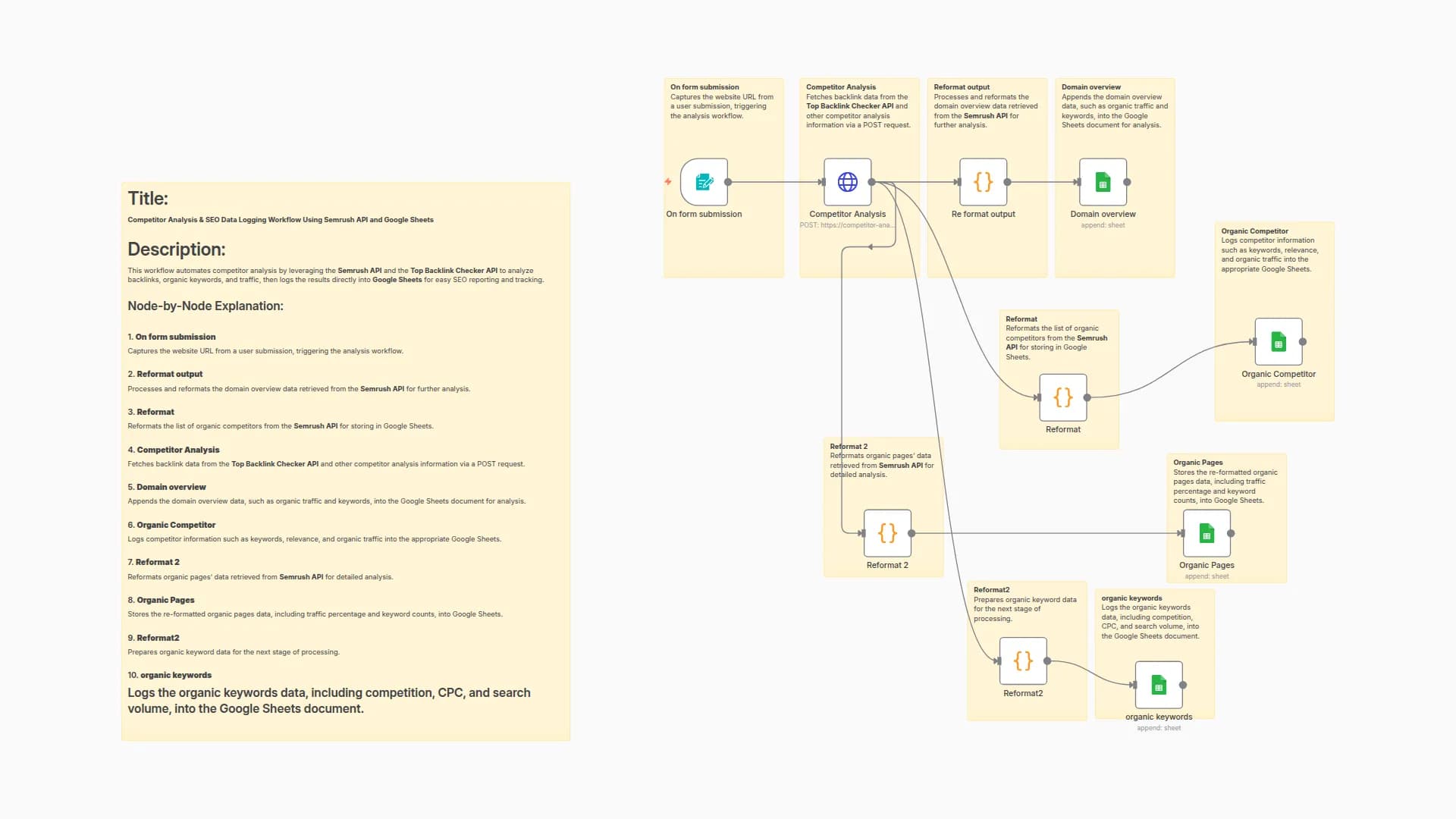
This n8n workflow automates SEO competitor analysis by integrating the Competitor Analysis API. It captures website domains via a simple user form, sends them to the API to retrieve competitor data, and logs the results directly into Google Sheets. The workflow intelligently handles empty or missing data and incorporates a wait node to respect API rate limits, making your competitor tracking seamless and reliable.
Node-by-Node Explanation
-
On Form Submission
Triggers the workflow when a user submits a website domain. -
Global Storage
Stores the submitted website domain for use in subsequent nodes. -
Competitor Analysis Request
Sends a POST request to the Competitor Analysis API to fetch organic competitors, pages, and keyword data. -
If (Condition Check)
Verifies that the API response contains valid, non-empty data. -
Google Sheets (Insert Success Data)
Appends the fetched competitor data to a specified Google Sheet. -
Wait Node
Adds a 5-second delay to avoid exceeding API rate limits. -
Google Sheets (Insert 'Not Found' Record)
Logs a “Not data found.” entry into Google Sheets if the API response lacks relevant data.
Use Cases & Benefits
- SEO Professionals: Automate competitor insights collection for efficient SEO research.
- Marketing Teams: Maintain consistent, automated logs of competitor data across multiple websites.
- Agencies: Manage organic search competitor tracking for many clients effortlessly.
- Reliability: Conditional checks and wait nodes ensure smooth API interaction and data integrity.
- Scalable & User-Friendly: Simple form input and Google Sheets integration enable easy adoption and scalability.
🔐 How to Get Your API Key for the Competitor Keyword Analysis API
- Go to 👉 Competitor Keyword Analysis API
- Click "Subscribe to Test" (you may need to sign up or log in).
- Choose a pricing plan (there’s a free tier for testing).
- After subscribing, click on the "Endpoints" tab.
- Your API Key will be visible in the "x-rapidapi-key" header.
🔑 Copy and paste this key into the httpRequest node in your workflow.
Create your free n8n account and set up the workflow in just a few minutes using the link below:
You may also like


New to n8n?
Need help building new n8n workflows? Process automation for you or your company will save you time and money, and it's completely free!


