Transcribe & Summarize Audio with Whisper and GPT, from Google Drive to Notion


Last edited 206 days ago
This workflow contains community nodes that are only compatible with the self-hosted version of n8n.
Overview
This workflow automates the process of transcribing audio files and summarizing them using OpenAI models, with the final output stored neatly in Notion. Whether you're a researcher, content creator, student, or professional, this automation saves time by converting voice recordings into actionable summaries with zero manual effort.
Created by: Abdullah Dilshad
Contact: [email protected]
Who It’s For
This template is ideal for:
- Researchers: Transcribe and summarize interviews, lectures, or research recordings.
- Content Creators: Convert podcasts or videos into transcripts and social captions/show notes.
- Students: Automatically turn lectures or study group audio into summarized notes.
- Professionals: Log meeting notes and summaries directly into your Notion workspace.
How It Works
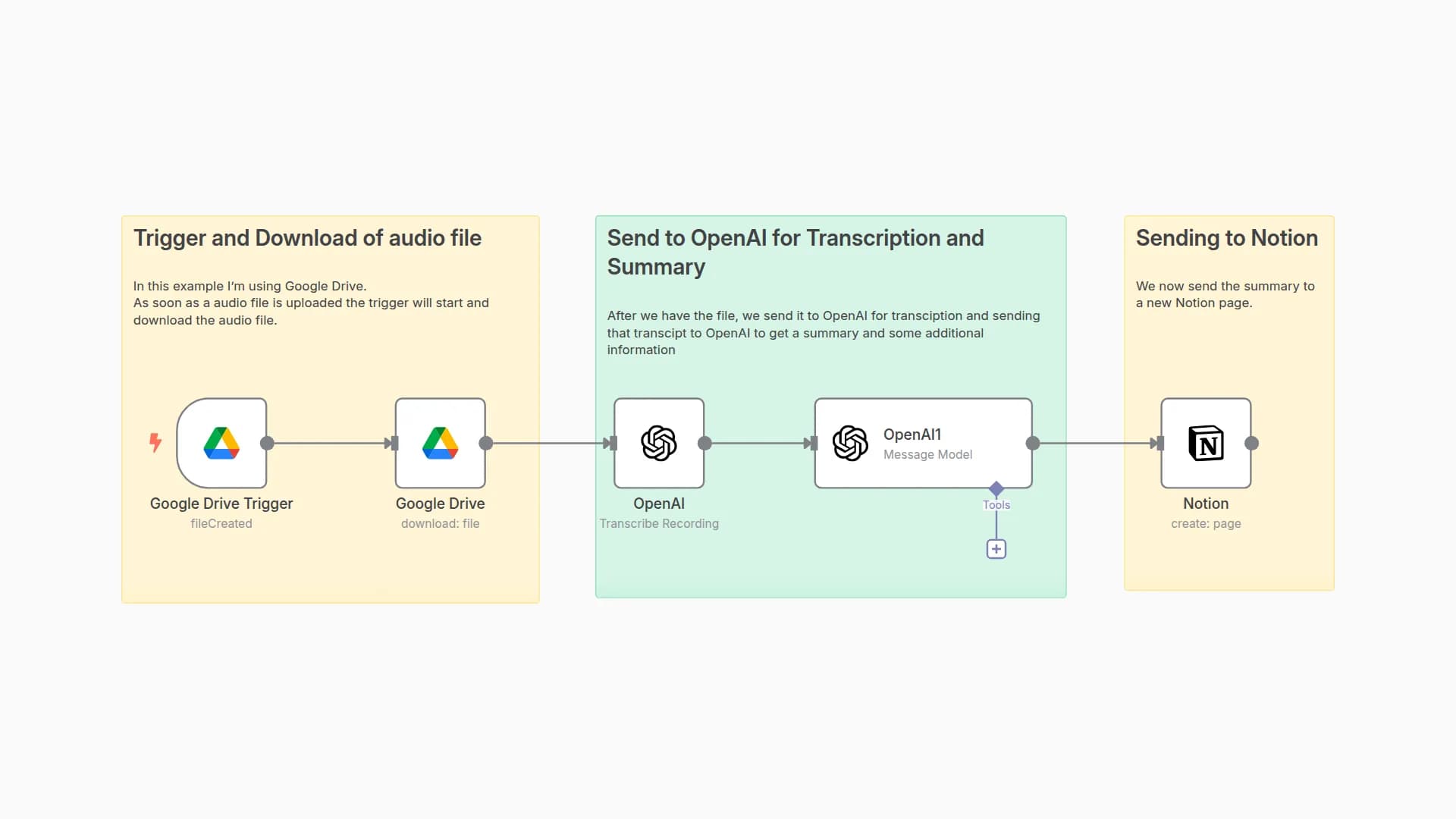
This four-step workflow performs the following:
-
Step 1: Trigger: New Audio in Google Drive
Automatically triggers when a new audio file (MP3/WAV) is uploaded to a specified Google Drive folder.The file is then downloaded for processing. -
Step 2: Transcribe Audio with Whisper
The audio file is sent to OpenAI’s Whisper model for high-accuracy transcription. -
Step 3: Summarize Transcript with GPT-4
The transcript is passed to GPT-4, which generates a clean, concise summary. -
Step 4: Store Summary in Notion
A new Notion page is created with the generated summary and optional metadata (file name, upload time, etc.).
Setup Instructions
-
Step 1: Google Drive Trigger
Connect your Google Drive account.
Select the folder you want to monitor.
This node detects new file uploads and passes the file for download. -
Step 2: Download File
Downloads the new audio file for transcription.
Step 3: Transcribe Recording (OpenAI Whisper)
Connect your OpenAI API Key.
Ensure this node receives the binary audio file.
It will return the transcription as plain text. -
Step 3: Transcribe Recording (OpenAI Whisper)
Connect your OpenAI API Key.
Ensure this node receives the binary audio file.
It will return the transcription as plain text. -
Step 4: Summarize Transcript (GPT-4 via AI Agent)
Use your OpenAI API Key.
Configure a summarization prompt like:
"Summarize the following transcript in a clear and concise manner:"
Connect the output from Whisper into this GPT-4 prompt. -
Step 5: Notion Integration
Connect your Notion account.
Choose or create a database to store summaries.
Map the GPT output (summary) to a "Text" or "Rich Text" property.
Optionally include metadata like filename, file upload date, etc.
You may also like
New to n8n?
Need help building new n8n workflows? Process automation for you or your company will save you time and money, and it's completely free!


