Trustpilot Insights Scraper: Auto Reviews via Bright Data + Google Sheets Sync


Last edited 206 days ago
Trustpilot Insights Scraper: Auto Reviews via Bright Data + Google Sheets Sync
Overview
A comprehensive n8n automation that scrapes Trustpilot business reviews using Bright Data and automatically stores structured data in Google Sheets.
Workflow Architecture
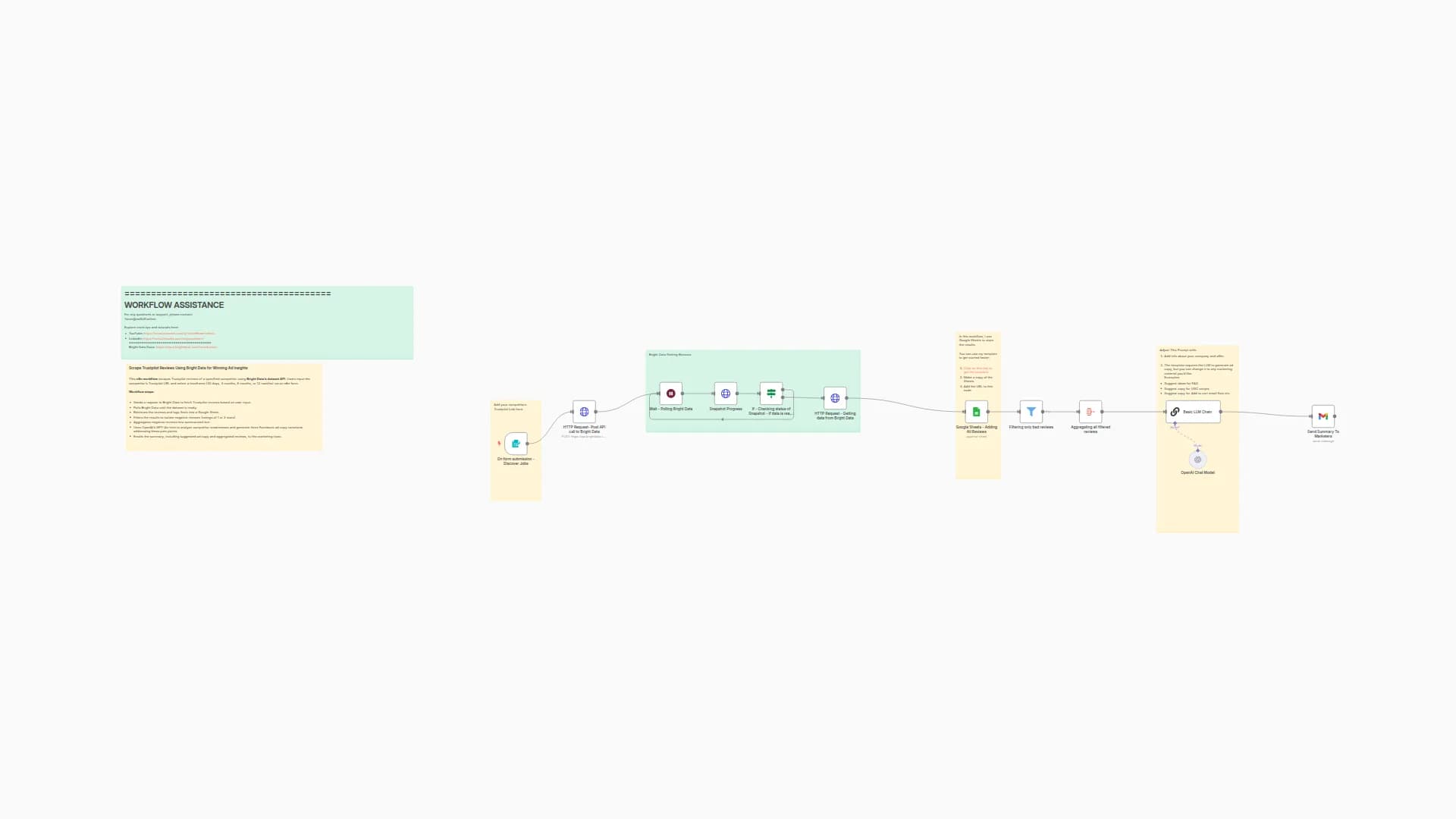
1. 📝 Form Trigger Node
Purpose: Manual input interface for users
- Type:
n8n-nodes-base.formTrigger - Configuration:
- Form Title: "Website URL"
- Field: "Trustpilot Website URL"
- Function: Accepts Trustpilot URL input from users to initiate the scraping process
2. 🌐 HTTP Request (Trigger Scraping)
Purpose: Initiates scraping on Bright Data platform
- Type:
n8n-nodes-base.httpRequest - Method: POST
- Endpoint:
https://api.brightdata.com/datasets/v3/trigger - Configuration:
- Query Parameters:
dataset_id:gd_lm5zmhwd2sni130pinclude_errors:truelimit_multiple_results:2
- Headers:
Authorization:Bearer BRIGHT_DATA_API_KEY
- Body: JSON with input URL and 35+ custom output fields
- Query Parameters:
Custom Output Fields
The workflow extracts the following data points:
- Company Information:
company_name,company_logo,company_overall_rating,company_total_reviews,company_about,company_email,company_phone,company_location,company_country,company_category,company_id,company_website - Review Data:
review_id,review_date,review_rating,review_title,review_content,review_date_of_experience,review_url,date_posted - Reviewer Information:
reviewer_name,reviewer_location,reviews_posted_overall - Review Metadata:
is_verified_review,review_replies,review_useful_count - Rating Distribution:
5_star,4_star,3_star,2_star,1_star - Additional Fields:
url,company_rating_name,is_verified_company,breadcrumbs,company_other_categories
3. ⌛ Snapshot Progress Check
Purpose: Monitors scraping job status
- Type:
n8n-nodes-base.httpRequest - Method: GET
- Endpoint:
https://api.brightdata.com/datasets/v3/progress/{{ $json.snapshot_id }} - Configuration:
- Query Parameters:
format=json - Headers:
Authorization: Bearer BRIGHT_DATA_API_KEY
- Query Parameters:
- Function: Receives snapshot_id from previous step and checks if data is ready
4. ✅ IF Node (Status Check)
Purpose: Determines next action based on scraping status
- Type:
n8n-nodes-base.if - Condition:
$json.status === "ready" - Logic:
- If True: Proceeds to data download
- If False: Triggers wait cycle
5. 🕒 Wait Node
Purpose: Implements polling delay for incomplete jobs
- Type:
n8n-nodes-base.wait - Duration: 1 minute
- Function: Pauses execution before re-checking snapshot status
6. 🔄 Loop Logic
Purpose: Continuous monitoring until completion
- Flow: Wait → Check Status → Evaluate → (Loop or Proceed)
- Prevents: API rate limiting and unnecessary requests
7. 📥 Snapshot Download
Purpose: Retrieves completed scraped data
- Type:
n8n-nodes-base.httpRequest - Method: GET
- Endpoint:
https://api.brightdata.com/datasets/v3/snapshot/{{ $json.snapshot_id }} - Configuration:
- Query Parameters:
format=json - Headers:
Authorization: Bearer BRIGHT_DATA_API_KEY
- Query Parameters:
8. 📊 Google Sheets Integration
Purpose: Stores extracted data in spreadsheet
- Type:
n8n-nodes-base.googleSheets - Operation: Append
- Configuration:
- Document ID:
1yQ10Q2qSjm-hhafHF2sXu-hohurW5_KD8fIv4IXEA3I - Sheet Name: "Trustpilot"
- Mapping: Auto-map all 35+ fields
- Credentials: Google OAuth2 integration
- Document ID:
Data Flow
User Input (URL)
    ↓
Bright Data API Call
    ↓
Snapshot ID Generated
    ↓
Status Check Loop
    ↓
Data Ready Check
    ↓
Download Complete Dataset
    ↓
Append to Google Sheets
Technical Specifications
Authentication
- Bright Data: Bearer token authentication
- Google Sheets: OAuth2 integration
Error Handling
- Includes error tracking in Bright Data requests
- Conditional logic prevents infinite loops
- Wait periods prevent API rate limiting
Data Processing
- Mapping Mode: Auto-map input data
- Schema: 35+ predefined fields with string types
- Conversion: No type conversion (preserves raw data)
Setup Requirements
Prerequisites
- Bright Data Account: Active account with API access
- Google Account: With Sheets API enabled
- n8n Instance: Self-hosted or cloud version
Configuration Steps
- API Keys: Configure Bright Data bearer token
- OAuth Setup: Connect Google Sheets credentials
- Dataset ID: Verify correct Bright Data dataset ID
- Sheet Access: Ensure proper permissions for target spreadsheet
Environment Variables
BRIGHT_DATA_API_KEY: Your Bright Data API authentication token
Use Cases
Business Intelligence
- Competitor analysis and market research
- Customer sentiment monitoring
- Brand reputation tracking
Data Analytics
- Review trend analysis
- Rating distribution studies
- Customer feedback aggregation
Automation Benefits
- Scalability: Handle multiple URLs sequentially
- Reliability: Built-in error handling and retry logic
- Efficiency: Automated data collection and storage
- Consistency: Standardized data format across all scrapes
Limitations and Considerations
Rate Limits
- Bright Data API has usage limitations
- 1-minute wait periods help manage request frequency
Data Volume
- Limited to 2 results per request (configurable)
- Large datasets may require multiple workflow runs
Compliance
- Ensure compliance with Trustpilot's terms of service
- Respect robots.txt and rate limiting guidelines
Monitoring and Maintenance
Status Tracking
- Monitor workflow execution logs
- Check Google Sheets for data accuracy
- Review Bright Data usage statistics
Regular Updates
- Update API keys as needed
- Verify dataset ID remains valid
- Test workflow functionality periodically
Workflow Metadata
- Version ID:
dd3afc3c-91fc-474e-99e0-1b25e62ab392 - Instance ID:
bc8ca75c203589705ae2e446cad7181d6f2a7cc1766f958ef9f34810e53b8cb2 - Execution Order: v1
- Active Status: Currently inactive (requires manual activation)
- Template Status: Credentials setup completed
For any questions or support, please contact: Email
or fill out this form
You may also like
New to n8n?
Need help building new n8n workflows? Process automation for you or your company will save you time and money, and it's completely free!


