AI-Driven Competitor & Market Intelligence with GPT 4 & Apify


Categories
Created by
maMarthLast edited 206 days ago
Automated AI-Driven Competitor & Market Intelligence System
-
Problem Solved: Small and Medium-sized IT companies often struggle to stay ahead in a rapidly evolving market. Manually tracking competitor moves, pricing changes, product updates, and emerging market trends is time-consuming, inconsistent, and often too slow for agile sales strategies. This leads to missed sales opportunities, ineffective pitches, and a reactive rather than proactive market approach.
-
Solution Overview: This n8n workflow automates the continuous collection and AI-powered analysis of competitor data and market trends. By leveraging web scraping, RSS feeds, and advanced AI models, it transforms raw data into actionable insights for your sales and marketing teams. The system generates structured reports, notifies relevant stakeholders, and stores intelligence in your database, empowering your team with real-time, strategic information.
-
For Whom: This high-value workflow is perfect for:
- IT Solution Providers & SaaS Companies: To maintain a competitive edge and tailor sales pitches based on competitor weaknesses and market opportunities.
- Sales & Marketing Leaders: To gain comprehensive, automated market intelligence without extensive manual research.
- Product Development Teams: To identify market gaps and validate new feature development based on competitive landscapes and customer sentiment.
- Business Strategists: To inform strategic planning with data-driven insights into industry trends and competitive threats.
How It Works (Scope of the Workflow) ⚙️
This system establishes a powerful, automated pipeline for market and competitor intelligence:
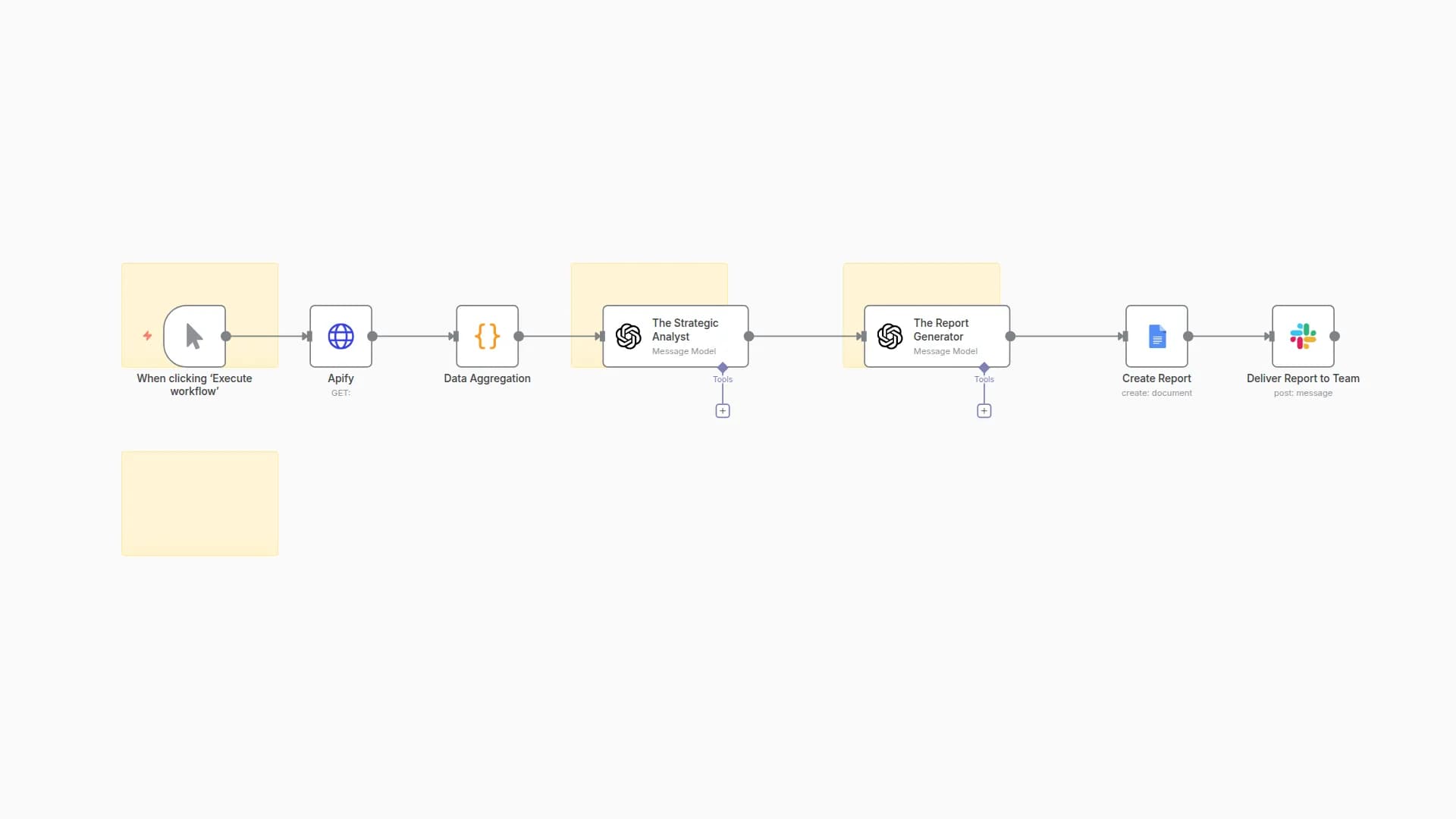
- Scheduled Data Collection: The workflow runs automatically at predefined intervals (e.g., weekly), initiating data retrieval from various online sources.
- Diverse Information Gathering: It pulls data from competitor websites (pricing, features, blogs via web scraping services), industry news and blogs (via RSS feeds), and potentially other sources.
- Intelligent Data Preparation: Collected data is aggregated, cleaned, and pre-processed using custom code to ensure it's in an optimal format for AI analysis, removing noise and extracting relevant text.
- AI-Powered Analysis: An advanced AI model (like OpenAI's GPT-4o) performs in-depth analysis on the cleaned data. It identifies competitor strengths, weaknesses, new offerings, pricing changes, customer sentiment from reviews, emerging market trends, and suggests specific opportunities and threats for your company.
- Automated Report Generation: The AI's structured insights are automatically populated into a professional Google Docs report using a predefined template, making the intelligence easily digestible for your team.
- Team Notification: Stakeholders (sales leads, marketing managers) receive automated notifications via Slack (or email), alerting them to the new report and key insights.
- Strategic Data Storage & Utilization: All analyzed insights are stored in a central database (e.g., PostgreSQL). This builds a historical record for long-term trend analysis and can optionally trigger sub-workflows to generate personalized sales talking points directly relevant to ongoing deals or specific prospects.
Setup Steps 🛠️ (Building the Workflow)
To implement this sophisticated workflow in your n8n instance, follow these detailed steps:
-
Prepare Your Digital Assets & Accounts:
- Google Sheet (Optional, if using for CRM data): For simpler CRM, create a sheet with
CompetitorName,LastAnalyzedDate,Strengths,Weaknesses,Opportunities,Threats,SalesTalkingPoints. - API Keys & Credentials:
- OpenAI API Key: Essential for the AI analysis.
- Web Scraping Service API Key: For services like Apify, Crawlbase, or similar (e.g., Bright Data, ScraperAPI).
- Database Access: Credentials for your PostgreSQL/MySQL database. Ensure you've created necessary tables (
competitor_profiles,market_trends) with appropriate columns. - Google Docs Credential: To link n8n to your Google Drive for report generation. Create a template Google Doc with placeholders (e.g.,
{{competitorName}},{{strengths}}). - Slack Credential: For sending team notifications to specific channels.
- CRM API Key (Optional): If directly integrating with HubSpot, Salesforce, or custom CRM via API.
- Google Sheet (Optional, if using for CRM data): For simpler CRM, create a sheet with
-
Identify Data Sources for Intelligence:
- Compile a list of competitor website URLs you want to monitor (e.g., pricing pages, blog sections, news).
- Identify relevant online review platforms (e.g., G2, Capterra) for competitor products.
- Gather RSS Feed URLs from key industry news sources, tech blogs, and competitor's own blogs.
- Define keywords for general market trends or competitor mentions, if using tools that provide RSS feeds (like Google Alerts).
-
Build the n8n Workflow (10 Key Nodes):
- Start a new workflow in n8n and add the following nodes, configuring their parameters and connections carefully:
- Cron (
Scheduled Analysis Trigger): Set this to trigger daily or weekly at a specific time (e.g.,Every Week,At Hour: 0,At Minute: 0). - HTTP Request (
Fetch Competitor Web Data): Configure this to call your chosen web scraping service's API. SetMethodtoPOST,URLto the service's API endpoint, and build theJSON/Raw Bodywith thestartUrls(competitor websites, review sites) for scraping, including your API Key inAuthentication(e.g.,Header Auth). - RSS Feed (
Fetch News & Blog RSS): Add the URLs of competitor blogs and industry news RSS feeds. - Merge (
Combine Data Sources): Connect inputs from bothFetch Competitor Web DataandFetch News & Blog RSS. UseMerge By Position. - Code (
Pre-process Data for AI): Write JavaScript code to iterate through merged items, extract relevant text content, perform basic cleaning (e.g., HTML stripping), and limit text length for AI input. Output should be an array of objects withcontent,title,url, andsource. - OpenAI (
AI Analysis & Competitor Insights): Select your OpenAI credential. SetResourcetoChat CompletionandModeltogpt-4o. InMessages, create aSystemmessage defining AI's role and aUsermessage containing the dynamic prompt (referencing{{ $json.map(item => ... ).join('\\n\\n') }}forcontent,title,url,source) and requesting a structured JSON output for analysis. SetOutputtoRaw Data. - Google Docs (
Generate Market Intelligence Report): Select your Google Docs credential. SetOperationtoCreate document from template. Provide yourTemplate Document IDand map theValuesfrom the parsed AI output (usingJSON.parse($json.choices[0].message.content).PropertyName) to your template placeholders. - Slack (
Sales & Marketing Team Notification): Select your Slack credential. SetChat IDto your team's Slack channel ID. Compose theTextmessage, referencing the report link ({{ $json.documentUrl }}) and key AI insights (e.g.,{{ JSON.parse($json.choices[0].message.content).Competitor_Name }}). - PostgreSQL (
Store Insights to Database): Select your PostgreSQL credential. SetOperationtoExecute Query. Write anINSERT ... ON CONFLICT DO UPDATESQL query to store the AI insights into yourcompetitor_profilesormarket_trendstable, mapping values from the parsed AI output. - OpenAI (
Generate Personalized Sales Talking Points- Optional Branch): This node can be part of the main workflow or a separate, manually triggered workflow. Configure it similarly to the main AI node, but with a prompt tailored to generate sales talking points based on a specific sales context and the stored insights.
-
Final Testing & Activation:
- Run a Test: Before going live, manually trigger the workflow from the first node. Carefully review the data at each stage to ensure correct processing and output. Verify that reports are generated, notifications are sent, and data is stored correctly.
- Activate Workflow: Once testing is complete and successful, activate the workflow in n8n.
This system will empower your IT company's sales team with invaluable, data-driven intelligence, enabling them to close more deals and stay ahead in the market.
You may also like
New to n8n?
Need help building new n8n workflows? Process automation for you or your company will save you time and money, and it's completely free!


