Automate WordPress & WooCommerce Content with OpenAI: Reviews, Comments & Updates


Last edited 206 days ago
This workflow automates reviews, comments, and content enhancements for WordPress and WooCommerce using AI.
It includes five independent paths that you can run manually or schedule automatically.
Features
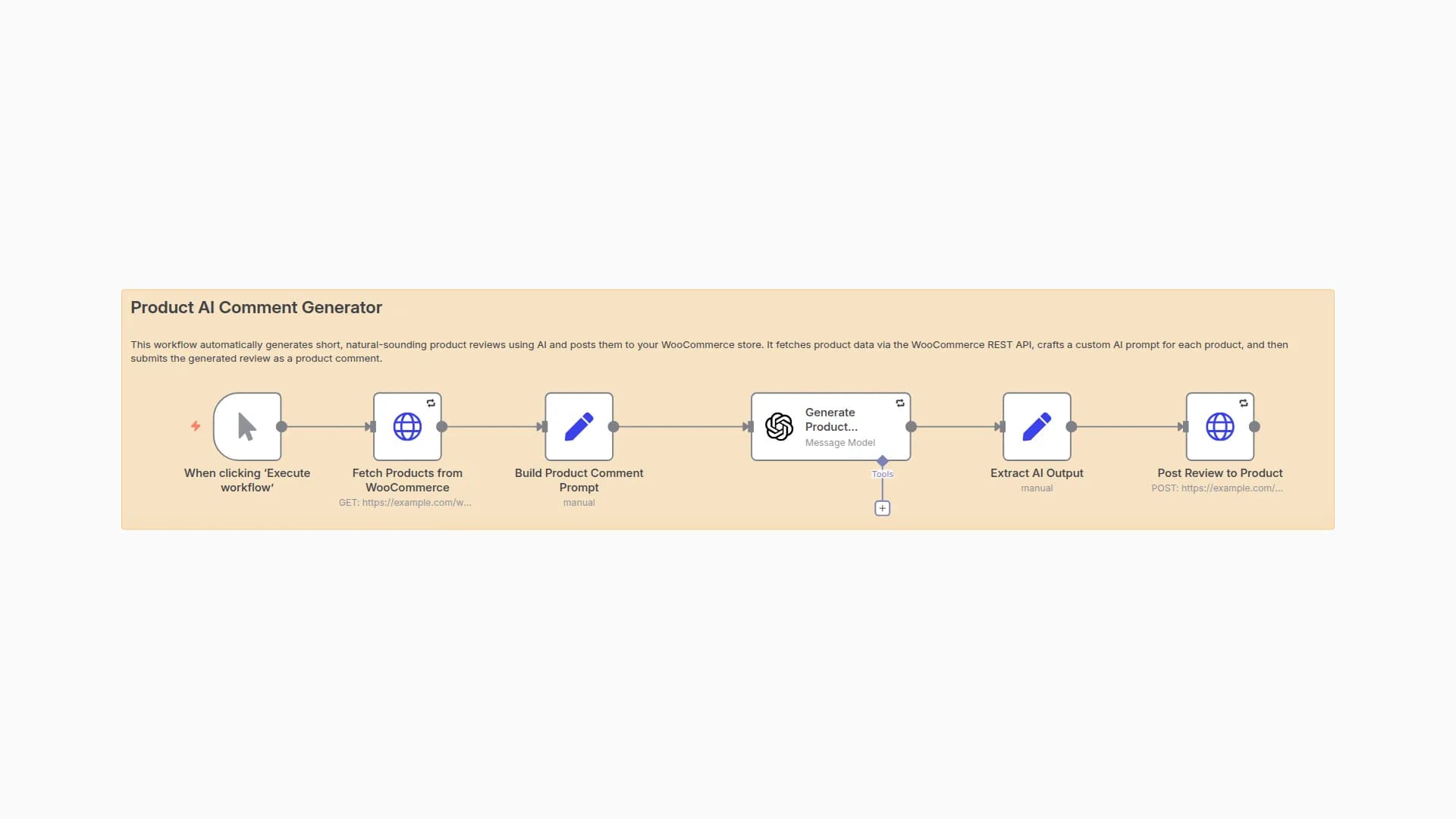
1. Product AI Comment Generator
Automatically generates short, natural product reviews using AI and posts them to WooCommerce products.
Fetches product data via REST API
Builds an AI prompt with product info
Posts generated review to WooCommerce
2. Article AI Comment Generator
Generates engaging, relevant comments for WordPress blog posts.
Fetches published articles
Builds AI prompt from post content
Submits generated comment to WordPress
3. Article Content Enhancer with AI Summary
Enhances articles with AI-generated headings & summary conclusions.
Fetches article content
Cleans HTML → plain text for AI prompt
Updates article with enhanced content
4. Product Category Content Enhancer
Improves WooCommerce product categories by adding AI-powered headings & summaries.
Fetches category details
Cleans description text
Generates new engaging section with AI
Updates category in WooCommerce
5. Product Content Enhancer
Optimizes WooCommerce product pages with AI-written descriptions.
Fetches products (description + short description)
Cleans & prepares text for AI
Generates new SEO-friendly text
Updates product in WooCommerce
How to Use
- Import this workflow into n8n.
- Configure your credentials:
- httpBasicAuth → WordPress/WooCommerce API credentials
- openAiApi → OpenAI API Key
- Replace all instances of example.com with your site’s domain.
- Run manually via Execute Workflow or enable Schedule Trigger for automation.
Requirements
WordPress site with REST API enabled
WooCommerce installed & active
Valid API keys:
WooCommerce Consumer Key & Secret
OpenAI API key
Notes
Multiple output methods are included (HTTP Request or WordPress Node). Use whichever works better for your setup.
AI prompts are customizable — adjust style, tone, or keywords for your niche.
This template is modular: You can use only the paths you need.
📖 Tip: Test each path separately first (e.g., only comments, only product content update) before enabling them all together.
You may also like
New to n8n?
Need help building new n8n workflows? Process automation for you or your company will save you time and money, and it's completely free!


