Automated Background Removal from Images with APImage AI


Last edited 206 days ago
This workflow automatically removes backgrounds from images using the APImage API. Simply provide an image URL, and the workflow will process it through AI-powered background removal, then download the processed image for use in your projects.
Who's it for
This template is perfect for:
- E-commerce businesses needing clean product images
- Content creators who need transparent background images
- Marketing teams processing large batches of images
- Developers building image processing applications
- Anyone who regularly needs background-free images
How it works
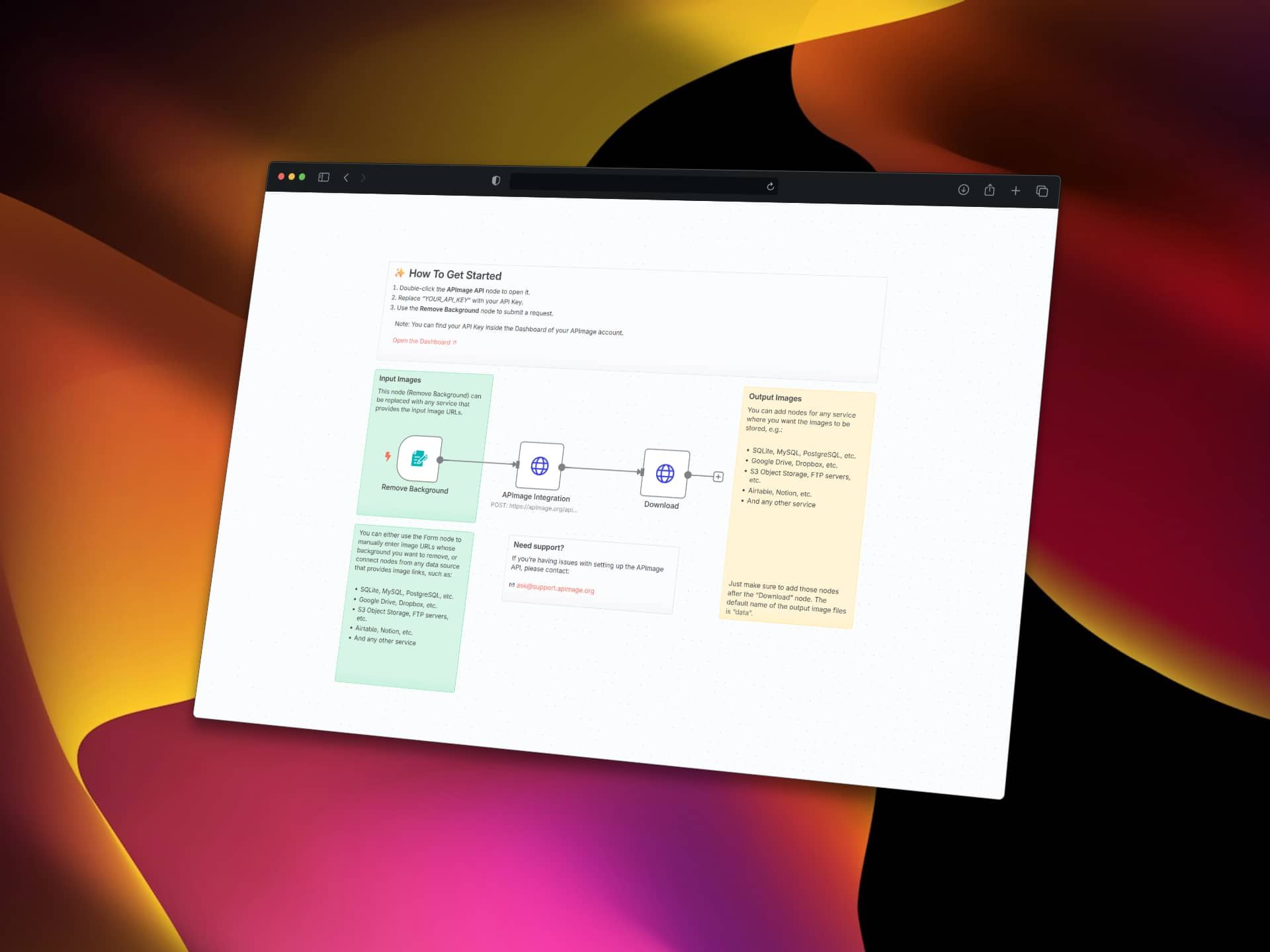
The workflow uses APImage's AI-powered background removal service to automatically detect and remove backgrounds from images. You provide an image URL through a form interface, the API processes the image using advanced AI algorithms, and returns a clean image with the background removed. The processed image is then downloaded and ready for use.
How to set up
-
Get your APImage API key:
- Sign in to the APImage Dashboard 🡥 (or create a new APImage account)
- Copy your API key from the dashboard
-
Configure the API connection:
- Double-click the APImage Integration node
- Replace
YOUR_API_KEYwith your actual API key (keep theBearerprefix)
-
Test the workflow:
- Click the Remove Background form trigger
- Enter an image URL in the form
- Submit to process the image
-
Set up output destination (optional):
- Add nodes after the Download node to save images to your preferred storage
- Options include Google Drive, Dropbox, databases, or cloud storage
Requirements
- n8n instance (cloud or self-hosted)
- APImage 🡥 account and valid API key
- Images accessible via public URLs for processing
How to customize the workflow
Replace Input Source:
Swap the Form Trigger with data from other sources like:
- Database queries (MySQL, PostgreSQL, SQLite)
- Cloud storage (Google Drive, Dropbox, S3)
- Other APIs or webhooks
- Airtable, Notion, or other productivity tools
Add Output Destinations:
Connect additional nodes after the Download step to save processed images to:
- Cloud storage services (Google Drive, Dropbox, S3)
- Databases for organized storage
- Content management systems
- Social media platforms
- Email attachments
Batch Processing:
Modify the workflow to process multiple images by connecting it to data sources that provide arrays of image URLs.
Add Image Validation:
Include nodes to validate image URLs or file formats before processing to avoid API errors.
Workflow Structure
Form Trigger → APImage Integration → Download → [Your Output Destination]
The Form Trigger collects image URLs, APImage Integration processes the background removal via API, Download retrieves the processed image, and you can add any output destination for the final images.
API Details
The workflow sends a POST request to https://apimage.org/api/ai-remove-background with:
- Authorization header: Your API key
- image_url: The URL of the image to process
- async: Set to false for immediate processing
The processed image is returned with a transparent background and downloaded automatically.
You may also like
New to n8n?
Need help building new n8n workflows? Process automation for you or your company will save you time and money, and it's completely free!


