Build a Scalable AI Chatbot with GPT-4 and Pipedream: Calendly, Gmail Integration


Last edited 206 days ago
This workflow contains community nodes that are only compatible with the self-hosted version of n8n.
This n8n workflow integrates the powerful Pipedream MCP server with AI capabilities to create a smart, extensible assistant that can interact with over 2,700 APIs and 10,000+ tools — all within a secure and modular structure.
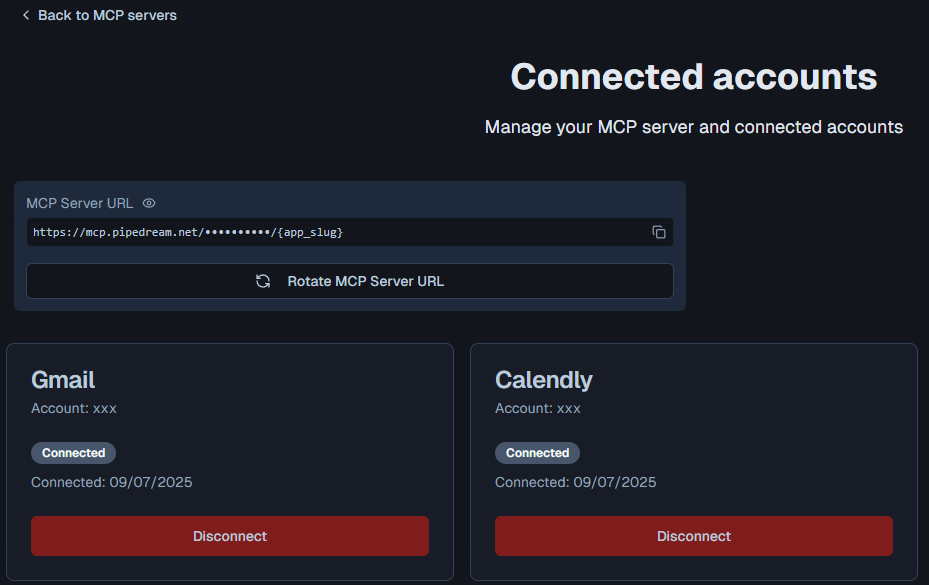
This setup seamlessly integrates Pipedream's MCP server with n8n, enabling your AI assistant to leverage thousands of APIs and tools securely.
Benefits
- Massive Tool Access: Instantly connect 2,700+ APIs using Pipedream MCP tools — from productivity apps to custom APIs — with zero-code integration.
- Dynamic AI Agent: The use of a LangChain agent allows for flexible tool execution and contextual conversations, powered by GPT.
- Easy Customization: Simply copy your MCP tool URL into the respective
sseEndpointfield to extend the agent’s capabilities. - Scalable and Modular: Add or remove tools (like Slack, Notion, Stripe, etc.) without altering the core logic.
- Secure and Revocable: Credentials and API access can be managed directly via Pipedream’s MCP dashboard.
How It Works
- Chat Trigger: The workflow begins when a chat message is received via the
When chat message receivednode, which acts as the entry point. - AI Agent Processing: The message is passed to the
AI Agentnode, which orchestrates the interaction using the connected tools and memory. - Language Model: The
OpenAI Chat Model(GPT-4.1-mini) processes the user's input and generates responses or actions. - Memory: The
Simple Memorynode retains context from the conversation to enable coherent multi-turn interactions. - Tool Integration:
- The
CalendlyandGmailnodes (connected via Pipedream's MCP server) allow the AI to perform actions like scheduling events or sending emails. These tools use SSE (Server-Sent Events) endpoints provided by Pipedream.
- The
- Response: The AI Agent combines the model's output and tool responses to deliver a final reply to the user.
Set Up Steps
- Sign Up for Pipedream:
- Create an account on and set up your MCP server.
- Configure MCP Tools:
- Connect your accounts (e.g., Calendly, Gmail) in Pipedream and obtain the SSE endpoints for each tool (e.g.,
https://mcp.pipedream.net/xxx/calendly_v2).
- Connect your accounts (e.g., Calendly, Gmail) in Pipedream and obtain the SSE endpoints for each tool (e.g.,
- Update n8n Nodes:
- Replace the placeholder SSE endpoints in the
CalendlyandGmailnodes with your Pipedream MCP URLs.
- Replace the placeholder SSE endpoints in the
- OpenAI Credentials:
- Ensure the
OpenAI Chat Modelnode has valid API credentials (configured under "OpenAi account").
- Ensure the
- Activate Workflow:
- Enable the
When chat message receivednode (currently disabled) and deploy the workflow.
- Enable the
Need help customizing?
Contact me for consulting and support or add me on Linkedin.
You may also like

New to n8n?
Need help building new n8n workflows? Process automation for you or your company will save you time and money, and it's completely free!


