Create a Knowledge Base Chatbot with OpenAI and Notion for Website Embedding

Created by
geGegenfeldLast edited 206 days ago
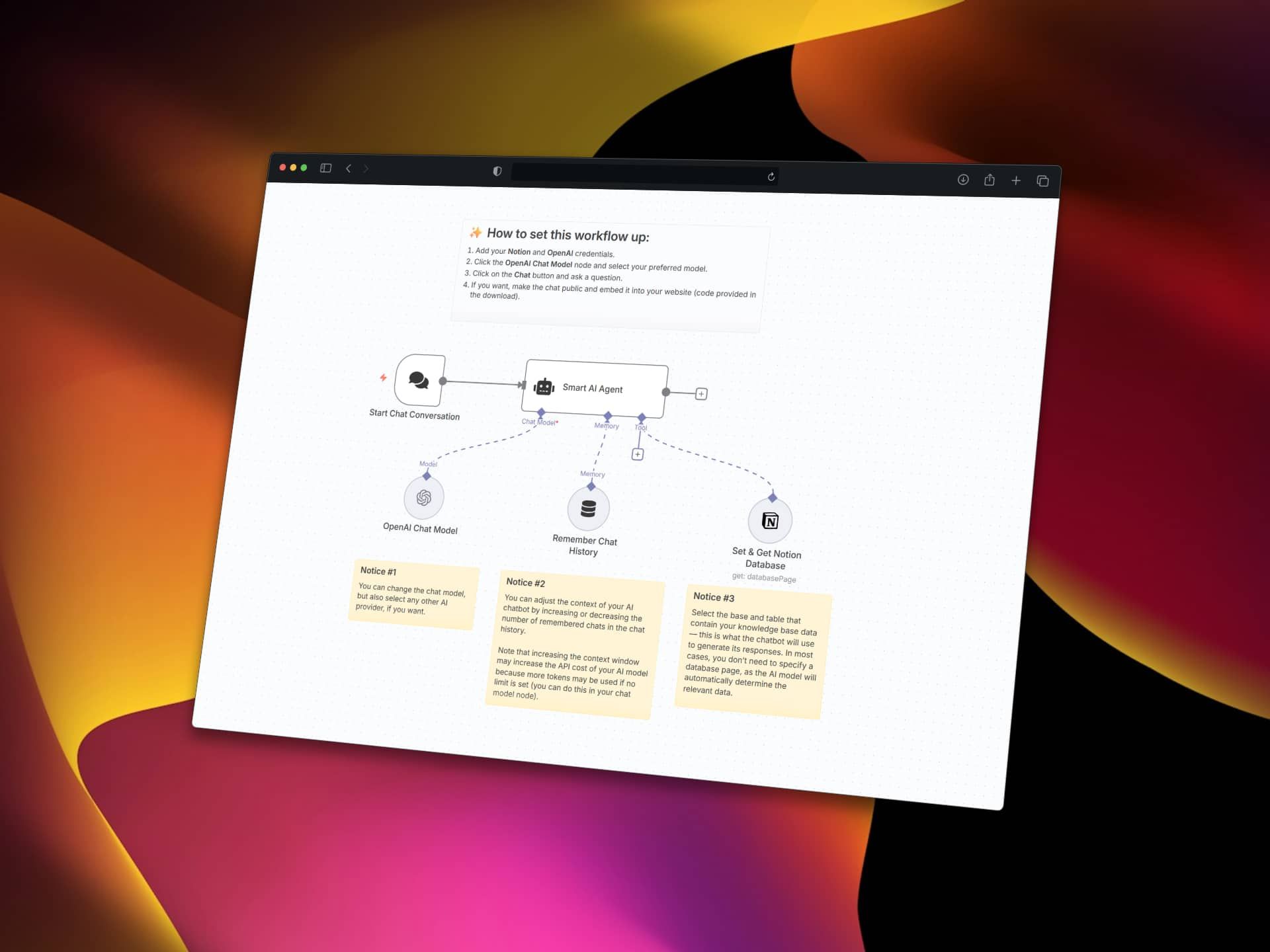
This workflow creates an AI chatbot that uses your Notion database as a knowledge base and allows for website embedding (e.g., as a customer support chatbot). The AI agent can automatically query your Notion pages and databases to provide accurate, contextual responses based on your stored content.
Who's it for
This template is perfect for:
- Support teams who maintain their knowledge base in Notion
- Content creators and teams managing documentation in Notion databases
- Businesses looking to make their Notion workspace conversationally accessible
- Anyone who wants to turn their Notion content into an interactive AI assistant
How it works
The workflow combines OpenAI's language model with Notion's database capabilities to create a smart chatbot. When users ask questions, the AI agent automatically determines which Notion pages or database entries are relevant and uses that content to generate helpful responses. The system maintains conversation history for natural, contextual interactions.
How to set up
-
Add your credentials:
- Configure your Notion API integration in the Set & Get Notion Database node
- Set up your OpenAI API credentials in the OpenAI Chat Model node
-
Configure your Notion connection:
- Click the Set & Get Notion Database node
- Select your Notion database or page containing your knowledge base content
- The AI will automatically determine relevant pages - no need to specify individual page IDs
-
Customize the AI model:
- Open the OpenAI Chat Model node
- Choose your preferred model (GPT-4, GPT-3.5-turbo, etc.)
- Adjust token limits if needed
-
Test the chatbot:
- Click the Chat button to start a conversation
- Ask questions related to your Notion content
-
Optional - Make it public:
- Enable public access in the Chat Trigger node
- Embed the provided code into your website
Requirements
- n8n instance (cloud or self-hosted)
- Notion workspace with databases or pages you want to query
- OpenAI API key with available credits
- Notion API integration with proper permissions
How to customize the workflow
Change the AI Provider:
You can replace the OpenAI Chat Model with other providers like Anthropic Claude, Google Gemini, or local models by swapping the language model node.
Adjust Context Window:
Modify the "Remember Chat History" node to increase or decrease how many previous messages the AI remembers (default is 10 interactions).
Update System Instructions:
Edit the Smart AI Agent's system message to change how the assistant behaves or add specific instructions for your use case.
Connect Multiple Databases:
Add additional Notion Database nodes to give the AI access to multiple databases or pages within your workspace.
Add More Tools:
Extend the AI agent with additional tools like web search, email sending, or integration with other services.
Workflow Structure
Chat Trigger → Smart AI Agent ← OpenAI Chat Model
                     ↓
         Set & Get Notion Database
                     ↑
           Remember Chat History
The Smart AI Agent orchestrates the conversation, deciding when to query Notion and how to use the retrieved content in responses. The memory buffer ensures natural conversation flow by maintaining context across interactions.
You may also like

New to n8n?
Need help building new n8n workflows? Process automation for you or your company will save you time and money, and it's completely free!


