Detect duplicate candidates from Gmail to Slack using Google Sheets


Last edited 205 days ago
Detect duplicate candidates by email/phone from Gmail to Slack using Google Sheets
This workflow automatically detects duplicate job applicants by checking incoming emails from Gmail against existing records in Google Sheets.
If a candidate's email is already found in the sheet, it sends an alert to Slack; otherwise, it adds the candidate to the sheet.
Who’s it for
- HR and recruitment teams processing candidate emails manually
- Startups or SMEs handling job applications via Gmail
- Anyone who wants to automate resume collection and deduplication
- Teams using Slack and Google Workspace
How it works
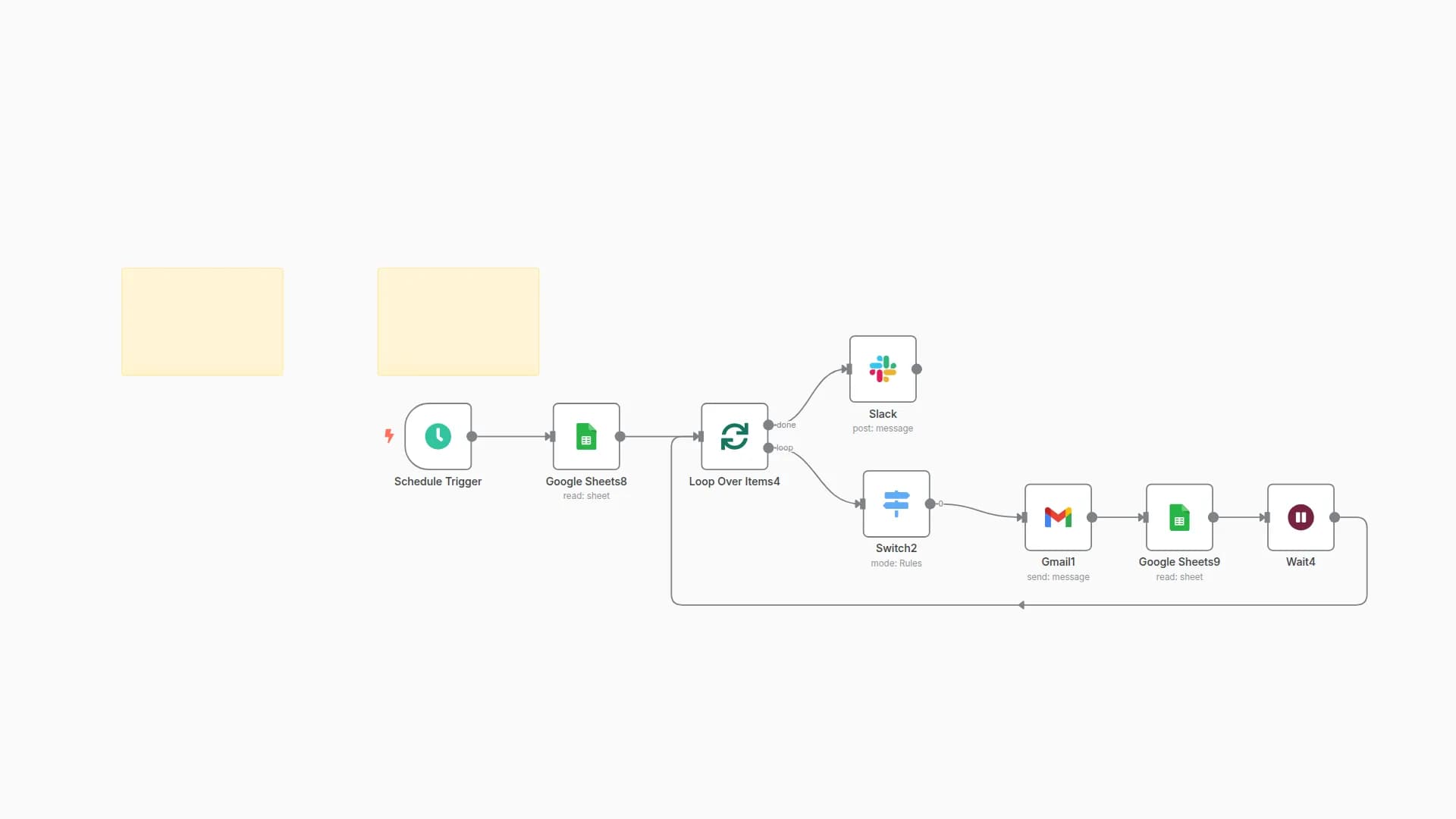
- Triggers every few minutes via the Schedule Trigger node
- Fetches recent emails labeled "applicant" from Gmail
- Extracts candidate details from the email body using regex
- Reads all existing rows from the Google Sheet
- Compares the candidate’s email with existing entries
- If duplicate → Sends a Slack alert
- If new → Appends to the Google Sheet
How to set up
-
Label candidate emails in Gmail with a label like
applicant -
Connect Gmail, Google Sheets, and Slack credentials in n8n
-
Create a Google Sheet with these columns:
candidate_name,candidate_email,candidate_phone,role_applied,years_of_experience,recruiter,resume_url,source_email
-
Import the workflow JSON
-
Update:
- Gmail label ID
- Google Sheet ID
- Slack channel or user
-
Activate the workflow
Requirements
- n8n (self-hosted or cloud)
- Gmail account with access to labeled application emails
- Google Sheet to store candidates
- Slack account with
chat:writescope - Basic regex familiarity (optional)
How to customize
- Change comparison logic to include phone numbers.
- Add fallback logic to check for similar names.
- Add filters for roles, experience levels.
- Forward resumes to Drive or Notion.
- Trigger an approval flow for screened candidates.
Add‑ons
- Google Drive: Upload parsed resumes.
- Notion / Airtable: Store structured candidate records.
- Webhooks: Forward to ATS or CRM.
- PDF parsers: Extract data from attachments.
Use Case Examples
Use Case
Description
Resume deduplication
Avoid processing the same applicant twice
Auto Slack alert
Instantly notify recruiter of repeat candidates
Centralized tracking
Keep candidate records in Sheets for filtering/export
Passive sourcing
Run hourly checks on labeled Gmail inboxes
Common troubleshooting
Issue
Possible Cause
Solution
Slack message not sent
Invalid Slack token / channel not selected
Reauthorize Slack connection and select correct user/channel
Google Sheet not updated
Sheet ID or tab name is incorrect
Double-check the Sheet URL and worksheet tab
Email data not extracted
Email body format doesn’t match regex
Adjust regex in the "Code" node
Nothing happens
Gmail label or date filter is too strict
Ensure emails exist with the right label in the last X minutes
Need Help?
Need help setting it up or tweaking regex for your custom email format? We’re happy to help — just ask!
Want to add phone number duplication checks or auto-resume upload to Google Drive? Our Automation team at WeblineIndia can guide you step-by-step.
You may also like
New to n8n?
Need help building new n8n workflows? Process automation for you or your company will save you time and money, and it's completely free!


