Generate SSL/TLS Certificate Expiry Reports with AWS ACM and AI for Slack & Email


Last edited 206 days ago
Automated SSL/TLS Certificate Expiry Report for AWS
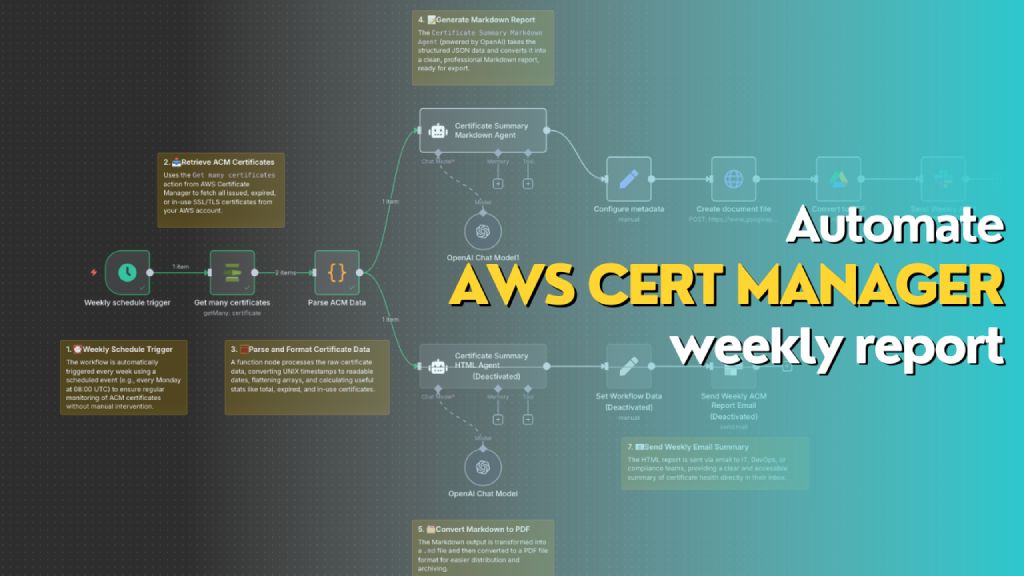
Automatically generates a weekly report of all AWS ACM certificates, including status, expiry dates, and renewal eligibility. The workflow formats the data into both Markdown (for PDF export to Slack) and HTML (for email summary), helping teams stay on top of certificate compliance and expiration risks.
Who’s it for
This workflow is designed for DevOps engineers, cloud administrators, and compliance teams who manage AWS infrastructure and need automated weekly visibility into the status of their SSL/TLS certificates in AWS Certificate Manager (ACM). It's ideal for teams that want to reduce the risk of expired certs, track renewal eligibility, and maintain reporting for audit or operational purposes.
How it works / What it does
This n8n workflow performs the following actions on a weekly schedule:
- Trigger: Automatically runs once a week using the
Weekly schedule trigger. - Fetch Certificates: Uses
Get many certificatesaction from AWS Certificate Manager to retrieve all certificate records. - Parse Data: Processes and reformats certificate data (dates, booleans, SANs, etc.) into a clean JSON object.
- Generate Reports:
- 📄 Markdown Report: Uses the
Certificate Summary Markdown Agent(OpenAI) to generate a Markdown report for PDF export. - 🌐 HTML Report: Uses the
Certificate Summary HTML Agentto generate a styled HTML report for email.
- 📄 Markdown Report: Uses the
- Deliver Reports:
- Converts Markdown to PDF and sends it to Slack as a file.
- Sends HTML content as a formatted email.
How to set up
-
Configure AWS Credentials in n8n to allow access to AWS ACM.
-
Create a new workflow and use the following nodes in sequence:
Schedule Trigger: Weekly (e.g., every Monday at 08:00 UTC)AWS ACM → Get many certificatesFunction Node → Parse ACM Data: Converts and summarizes certificate metadataOpenAI Chat Node (Markdown Agent)with a system/user prompt to generate MarkdownConfigure Metadata→ Define file name and MIME type (.md)Create document file→ Converts Markdown to document streamConvert to PDFSlack Node→ Upload the PDF to a channel- (Optional) Add a second
OpenAI Chat Nodefor generating HTML and sending it via email
-
Connect Output:
- Markdown report → Slack file upload
- HTML report → Email node with embedded HTML
Requirements
- 🟩 n8n instance (self-hosted or cloud)
- 🟦 AWS account with access to ACM
- 🟨 OpenAI API key (for ChatGPT Agent)
- 🟥 Slack webhook or OAuth credentials (for file upload)
- 📧 Email integration (e.g., SMTP or SendGrid)
- 📝 Permissions to write documents (Google Drive / file node)
How to customize the workflow
- Change report frequency: Adjust the
Weekly schedule triggerto daily or monthly as needed. - Filter certificates:
- Modify the function node to only include
EXPIRED,IN_USE, orINELIGIBLEcerts. - Add tags or domains to include/exclude.
- Modify the function node to only include
- Add visuals: Enhance the HTML version with colored rows, icons, or company branding.
- Change delivery channels:
- Replace Slack with Microsoft Teams, Discord, or Telegram.
- Send Markdown as email attachment instead of PDF.
- Integrate ticketing:
- Create a JIRA/GitHub issue for each certificate that is
EXPIREDorINELIGIBLE.
- Create a JIRA/GitHub issue for each certificate that is
You may also like
New to n8n?
Need help building new n8n workflows? Process automation for you or your company will save you time and money, and it's completely free!


