Send real-time Kubernetes(EKS/GKE/AKS) CPU spike alerts from Prometheus to Slack


Last edited 206 days ago
🧾 Summary
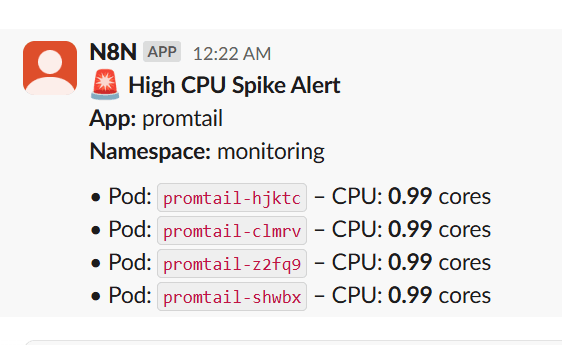
This workflow monitors Kubernetes pod CPU usage using Prometheus, and sends real-time Slack alerts when CPU consumption crosses a threshold (e.g., 0.8 cores). It groups pods by application name to reduce noise and improve clarity, making it ideal for observability across multi-pod deployments like Argo CD, Loki, Promtail, applications etc.
👥 Who’s it for
Designed for DevOps and SRE teams and platform teams, this workflow is 100% no-code, plug-and-play, and can be easily extended to support memory, disk, or network spikes. It eliminates the need for Alertmanager by routing critical alerts directly into Slack using native n8n nodes.
⚙️ What it does
This n8n workflow polls Prometheus every 5 minutes ⏱️, checks if any pod's CPU usage crosses a defined threshold (e.g., 0.8 cores) 🚨, groups them by app 🧩, and sends structured alerts to a Slack channel 💬.
🛠️ How to set up
🔗 Set your Prometheus URL with required metrics (container_cpu_usage_seconds_total, kube_pod_container_resource_limits)
🔐 Add your Slack bot token with chat:write scope
🧩 Import the workflow, customize:
Threshold (e.g., 0.8 cores)
Slack channel
Cron schedule
📋 Requirements
- A working Prometheus stack with kube-state-metrics
- Slack bot credentials
- n8n instance (self-hosted or cloud)
🧑💻 How to customize
🧠 Adjust threshold values or query interval
📈 Add memory/disk/network usage metrics
💡 This is a plug-and-play Kubernetes alerting template for real-time observability.
🏷️ Tags:
Prometheus, Slack, Kubernetes, Alert, n8n, DevOps, Observability, CPU Spike, Monitoring
Prometheus Spike Alert to Slack
You may also like
New to n8n?
Need help building new n8n workflows? Process automation for you or your company will save you time and money, and it's completely free!


