Create a Knowledge Base Chatbot with Google Drive & GPT-4o using Vector Search


Created by
goGofiveLast edited 223 days ago
Template: Create an AI Knowledge Base Chatbot with Google Drive and OpenAI GPT (Venio/Salesbear)
📋 Template Overview
This comprehensive n8n workflow template creates an intelligent AI chatbot that automatically transforms your Google Drive documents into a searchable knowledge base. The chatbot uses OpenAI's GPT models to provide accurate, context-aware responses based exclusively on your uploaded documents, making it perfect for customer support, internal documentation, and knowledge management systems.
🎯 What This Template Does
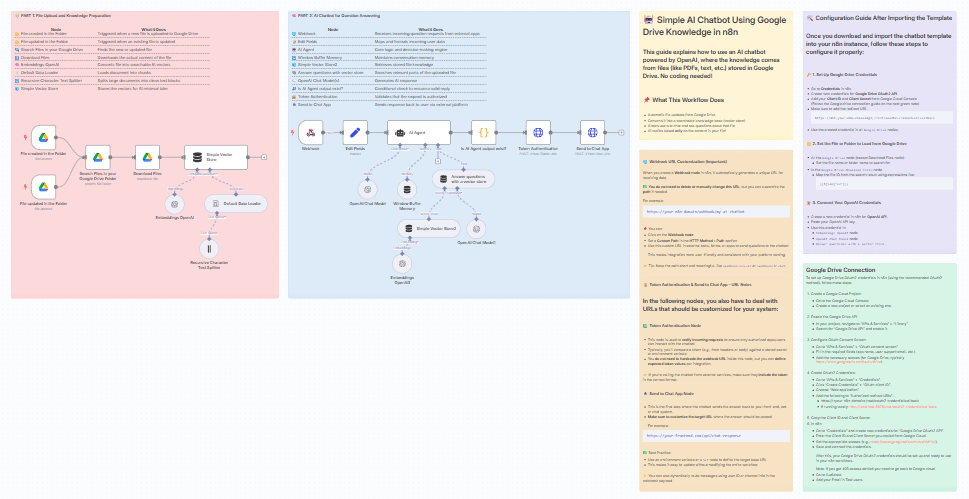
Automated Knowledge Processing
- Real-time Document Monitoring: Automatically detects when files are added or updated in your designated Google Drive folder
- Intelligent Document Processing: Converts PDFs, text files, and other documents into searchable vector embeddings
- Smart Text Chunking: Breaks down large documents into optimally-sized chunks for better AI comprehension
- Vector Storage: Creates a searchable knowledge base that the AI can query for relevant information
AI-Powered Chat Interface
- Webhook Integration: Receives questions via HTTP requests from any external platform (Venio/Salesbear)
- Contextual Responses: Maintains conversation history for natural, flowing interactions
- Source-Grounded Answers: Provides responses based strictly on your document content, preventing hallucinations
- Multi-platform Support: Works with any chat platform that can send HTTP requests
🔧 Pre-conditions and Requirements
Required API Accounts and Permissions
1. Google Drive API Access
- Google Cloud Platform account
- Google Drive API enabled
- OAuth2 credentials configured
- Read access to your target Google Drive folder
2. OpenAI API Account
- Active OpenAI account with API access
- Sufficient API credits for embeddings and chat completions
- API key with appropriate permissions
3. n8n Instance
- n8n cloud account or self-hosted instance
- Webhook functionality enabled
- Ability to install community nodes (LangChain nodes)
4. Target Chat Platform (Optional)
- API credentials for your chosen chat platform
- Webhook capability or API endpoints for message sending
Required Permissions
- Google Drive: Read access to folder contents and file downloads
- OpenAI: API access for text-embedding-ada-002 and gpt-4o-mini models
- External Platform: API access for sending/receiving messages (if integrating with existing chat systems)
🚀 Detailed Workflow Operation
Phase 1: Knowledge Base Creation
- File Monitoring: Two trigger nodes continuously monitor your Google Drive folder for new files or updates
- Document Discovery: When changes are detected, the workflow searches for and identifies the modified files
- Content Extraction: Downloads the actual file content from Google Drive
- Text Processing: Uses LangChain's document loader to extract text from various file formats
- Intelligent Chunking: Splits documents into overlapping chunks (configurable size) for optimal AI processing
- Vector Generation: Creates embeddings using OpenAI's text-embedding-ada-002 model
- Storage: Stores vectors in an in-memory vector store for instant retrieval
Phase 2: Chat Interaction
- Question Reception: Webhook receives user questions in JSON format
- Data Extraction: Parses incoming data to extract chat content and session information
- AI Processing: AI Agent analyzes the question and determines relevant context
- Knowledge Retrieval: Searches the vector store for the most relevant document sections
- Response Generation: OpenAI generates responses based on found content and conversation history
- Authentication: Validates the request using token-based authentication
- Response Delivery: Sends the answer back to the originating platform
📚 Usage Instructions After Setup
Adding Documents to Your Knowledge Base
- Upload Files: Simply drag and drop documents into your configured Google Drive folder
- Supported Formats: PDFs, TXT, DOC, DOCX, and other text-based formats
- Automatic Processing: The workflow will automatically detect and process new files within minutes
- Updates: Modify existing files, and the knowledge base will automatically update
Integrating with Your Chat Platform
Webhook URL: Use the generated webhook URL to send questions
POST https://your-n8n-domain/webhook/your-custom-path
Content-Type: application/json

{
"body": {
"Data": {
"ChatMessage": {
"Content": "What are your business hours?",
"RoomId": "user-123-session",
"Platform": "web",
"User": {
"CompanyId": "company-456"
}
}
}
}
}
Response Format: The chatbot returns structured responses that your platform can display
Testing Your Chatbot
- Initial Test: Send a simple question about content you know exists in your documents
- Context Testing: Ask follow-up questions to test conversation memory
- Edge Cases: Try questions about topics not in your documents to verify appropriate responses
- Performance: Monitor response times and accuracy
🎨 Customization Options
System Message Customization
Modify the AI Agent's system message to match your brand and use case:
You are a [YOUR_BRAND] customer support specialist. You provide helpful, accurate information based on our documentation. Always maintain a [TONE] tone and [SPECIFIC_GUIDELINES].
Response Behavior Customization
- Tone and Voice: Adjust from professional to casual, formal to friendly
- Response Length: Configure for brief answers or detailed explanations
- Fallback Messages: Customize what the bot says when it can't find relevant information
- Language Support: Adapt for different languages or technical terminologies
Technical Configuration Options
Document Processing
- Chunk Size: Adjust from 1000 to 4000 characters based on your document complexity
- Overlap: Modify overlap percentage for better context preservation
- File Types: Add support for additional document formats
AI Model Configuration
- Model Selection: Switch between gpt-4o-mini (cost-effective) and gpt-4 (higher quality)
- Temperature: Adjust creativity vs. factual accuracy (0.0 to 1.0)
- Max Tokens: Control response length limits
Memory and Context
- Conversation Window: Adjust how many previous messages to remember
- Session Management: Configure session timeout and user identification
- Context Retrieval: Tune how many document chunks to consider per query
Integration Customization
Authentication Methods
- Token-based: Default implementation with bearer tokens
- API Key: Simple API key validation
- OAuth: Full OAuth2 implementation for secure access
- Custom Headers: Validate specific headers or signatures
Response Formatting
- JSON Structure: Customize response format for your platform
- Markdown Support: Enable rich text formatting in responses
- Error Handling: Define custom error messages and codes
🎯 Specific Use Case Examples
Customer Support Chatbot
Scenario: E-commerce company with product documentation, return policies, and FAQ documents
Setup: Upload product manuals, policy documents, and common questions to Google Drive
Customization: Professional tone, concise answers, escalation triggers for complex issues
Integration: Website chat widget, mobile app, or customer portal
Internal HR Knowledge Base
Scenario: Company HR department with employee handbook, policies, and procedures
Setup: Upload HR policies, benefits information, and procedural documents
Customization: Friendly but professional tone, detailed policy explanations
Integration: Internal Slack bot, employee portal, or HR ticketing system
Technical Documentation Assistant
Scenario: Software company with API documentation, user guides, and troubleshooting docs
Setup: Upload API docs, user manuals, and technical specifications
Customization: Technical tone, code examples, step-by-step instructions
Integration: Developer portal, support ticket system, or documentation website
Educational Content Helper
Scenario: Educational institution with course materials, policies, and student resources
Setup: Upload syllabi, course content, academic policies, and student guides
Customization: Helpful and encouraging tone, detailed explanations
Integration: Learning management system, student portal, or mobile app
Healthcare Information Assistant
Scenario: Medical practice with patient information, procedures, and policy documents
Setup: Upload patient guidelines, procedure explanations, and practice policies
Customization: Compassionate tone, clear medical explanations, disclaimer messaging
Integration: Patient portal, appointment system, or mobile health app
🔧 Advanced Customization Examples
Multi-Language Support
// In Edit Fields node, detect language and route accordingly
const language = $json.body.Data.ChatMessage.Language || 'en';
const systemMessage = {
'en': 'You are a helpful customer support assistant...',
'es': 'Eres un asistente de soporte al cliente útil...',
'fr': 'Vous êtes un assistant de support client utile...'
};
Department-Specific Routing
// Route questions to different knowledge bases based on department
const department = $json.body.Data.ChatMessage.Department;
const vectorStoreKey = `vector_store_${department}`;
Advanced Analytics Integration
// Track conversation metrics
const analytics = {
userId: $json.body.Data.ChatMessage.User.Id,
timestamp: new Date().toISOString(),
question: $json.body.Data.ChatMessage.Content,
response: $json.response,
responseTime: $json.processingTime
};
📊 Performance Optimization Tips
Document Management
- Optimal File Size: Keep documents under 10MB for faster processing
- Clear Structure: Use headers and sections for better chunking
- Regular Updates: Remove outdated documents to maintain accuracy
- Logical Organization: Group related documents in subfolders
Response Quality
- System Message Refinement: Regularly update based on user feedback
- Context Tuning: Adjust chunk size and overlap for your specific content
- Testing Framework: Implement systematic testing for response accuracy
- User Feedback Loop: Collect and analyze user satisfaction data
Cost Management
- Model Selection: Use gpt-4o-mini for cost-effective responses
- Caching Strategy: Implement response caching for frequently asked questions
- Usage Monitoring: Track API usage and set up alerts
- Batch Processing: Process multiple documents efficiently
🛡️ Security and Compliance
Data Protection
- Document Security: Ensure sensitive documents are properly secured
- Access Control: Implement proper authentication and authorization
- Data Retention: Configure appropriate data retention policies
- Audit Logging: Track all interactions for compliance
Privacy Considerations
- User Data: Minimize collection and storage of personal information
- Session Management: Implement secure session handling
- Compliance: Ensure adherence to relevant privacy regulations
- Encryption: Use HTTPS for all communications
🚀 Deployment and Scaling
Production Readiness
- Environment Variables: Use environment variables for sensitive configurations
- Error Handling: Implement comprehensive error handling and logging
- Monitoring: Set up monitoring for workflow health and performance
- Backup Strategy: Ensure document and configuration backups
Scaling Considerations
- Load Testing: Test with expected user volumes
- Rate Limiting: Implement appropriate rate limiting
- Database Scaling: Consider external vector database for large-scale deployments
- Multi-Instance: Configure for multiple n8n instances if needed
📈 Success Metrics and KPIs
Quantitative Metrics
- Response Accuracy: Percentage of correct answers
- Response Time: Average time from question to answer
- User Satisfaction: Rating scores and feedback
- Usage Volume: Questions per day/week/month
- Cost Efficiency: Cost per interaction
Qualitative Metrics
- User Feedback: Qualitative feedback on response quality
- Use Case Coverage: Percentage of user needs addressed
- Knowledge Gaps: Identification of missing information
- Conversation Quality: Natural flow and context understanding
You may also like
New to n8n?
Need help building new n8n workflows? Process automation for you or your company will save you time and money, and it's completely free!


