Generate Personalized Cold Outreach Icebreakers with GPT-4 and Google Sheets


Last edited 206 days ago
Automated Personalized Email Icebreakers
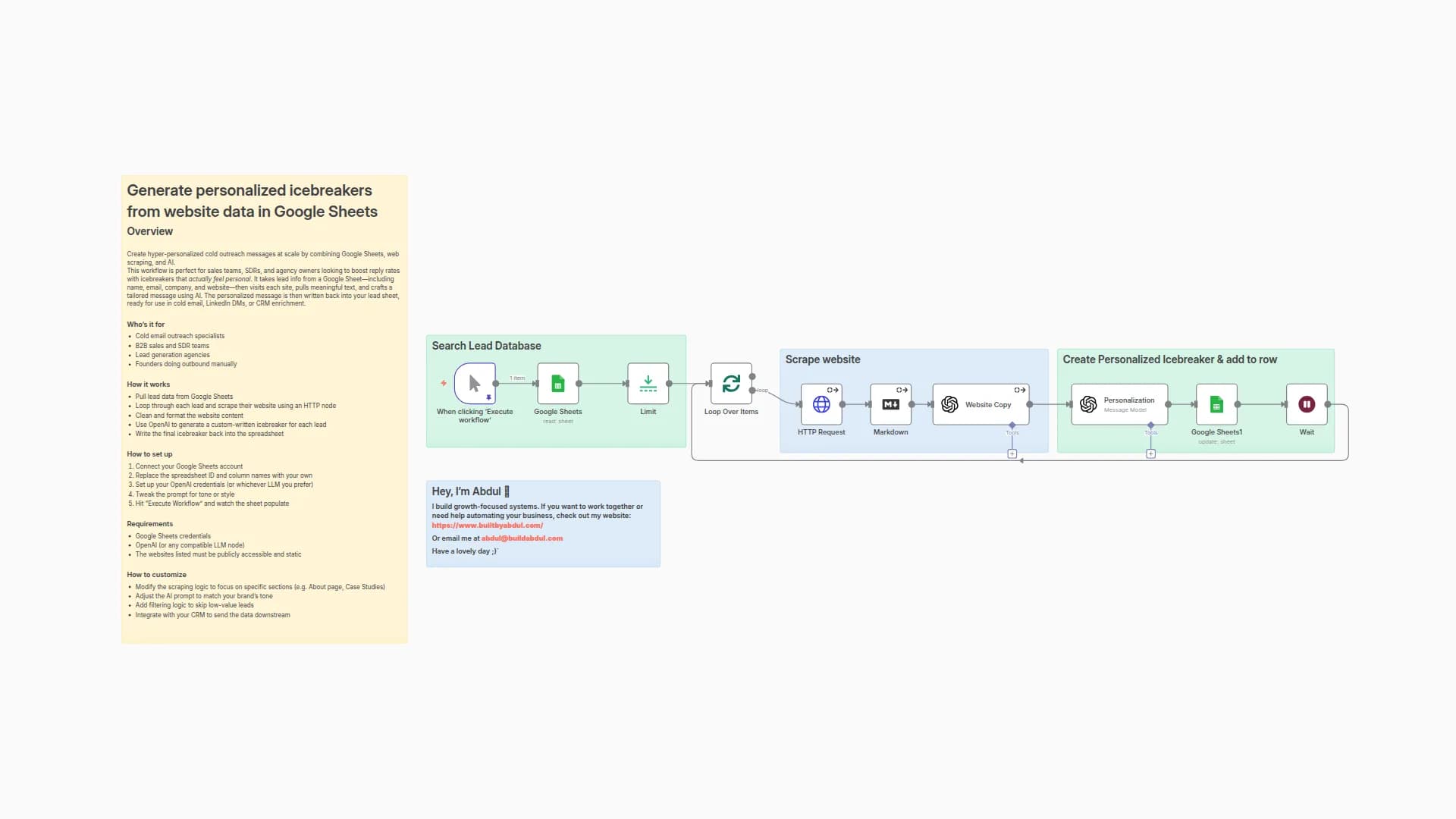
This workflow automates creating personalized email icebreakers. It reads leads from a Google Sheet, scrapes their company website, uses OpenAI to analyze the data and craft a unique opening line, and then saves that icebreaker back into the original sheet.
How It Works
- Fetch Lead: The workflow starts, loops through your leads, and pulls one from your Google Sheet.
- Scrape & Summarize: It scrapes the lead's company website and uses a fast OpenAI model to summarize the key points about the company and the person.
- Generate Icebreaker: This summary is then sent to a more powerful OpenAI model, which follows specific instructions to write a short, personalized icebreaker.
- Update Sheet: The new icebreaker is saved back into the correct lead's row in your Google Sheet, using their email to match the record.
Requirements
- An n8n instance.
- An OpenAI API key with available credits.
- A Google account with a Sheet for your leads.
- The Google Sheet must have columns for lead data (e.g.,
Email,Website,Company Name) and an empty column namedicebreaker. - The
Emailcolumn must be unique for each lead.
Setup Instructions
- Add Credentials: In n8n, add your OpenAI API key and connect your Google account via the Credentials menu.
- Configure Google Sheets Nodes: Select each of the two Google Sheets nodes (
Client dataandAdd icebreaker to sheet). In each, choose your credential, select your spreadsheet and the specific sheet name, and ensure the column mapping is correct. - Configure OpenAI Nodes: Select both OpenAI nodes (
Summarising prospect dataandCreating icebreaker) and choose your OpenAI credential from the dropdown. - Verify Update Node: On the final
Add icebreaker to sheetnode, ensure the Operation is set toAppend Or Updateand the Matching Columns field is set toEmail.
Customization Options 💡
- Trigger: Change the manual start to an automatic trigger, like when a new row is added to the sheet or on a daily schedule (Cron).
- AI Prompt: Modify the prompt in the "Creating icebreaker" node to change the tone, style, or length of the output.
- AI Model: Experiment with different OpenAI models (like
gpt-4o) for a different balance of cost, speed, and quality. - Data Source: Replace Google Sheets with a CRM like HubSpot or a database like Postgres.
You may also like


New to n8n?
Need help building new n8n workflows? Process automation for you or your company will save you time and money, and it's completely free!


